
题库地址
- 上传者:Fahad Siddique
- 上传时间:Jul 16, 2025
- 题库地址:
https://www.scribd.com/document/889002352/VMware-2V0-21-23-104%E9%A2%98-%E6%96%B0
Question 1
An administrator manually configures a reference ESXi host that meets company security standards for vSphere environments. The administrator now needs to apply all of the security standards to every identically configured host across multiple vSphere clusters within a single VMware vCenter instance.
Which four steps would the administrator complete to meet this requirement? (Choose four.)
-
A. Extract the host profile from the reference host. - B. Export the host profile from vCenter.
- C. Import host customization on the reference host.
-
D. Attach the host profile to each cluster that requires the secure configuration. -
E. Check the compliance of each host against the host profile. - F. Reset host customization on the reference host.
-
G. Remediate all non-compliant hosts.
解答和参考链接
Explanation
To apply the security standards from a reference host to other hosts across multiple clusters, the administrator needs to extract a host profile from the reference host, which captures its configuration settings; attach the host profile to each cluster that requires the same configuration; check the compliance of each host against the host profile, which compares their settings; and remediate all non-compliant hosts, which applies the configuration settings from the host profile.
References
暂时没找到
Question 2
An administrator creates a virtual machine that contains the latest company-approved software, tools and security updates. Company policy requires that only full clones are allowed for server workloads.
A combination of which two tasks should the administrator complete to prepare for the deployment of this virtual machine for multiple users? (Choose two.)
- A. Set appropriate permissions on the virtual machine.
-
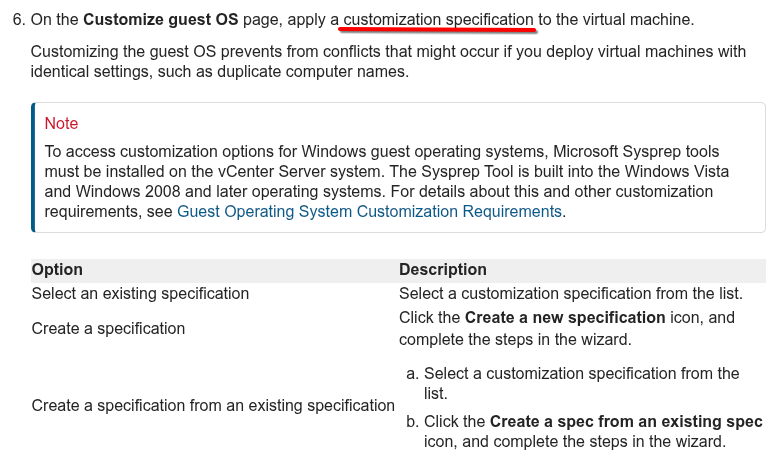
B. Create a virtual machine customization specification. - C. Upgrade the virtual hardware.
-
D. Convert the virtual machine to a template. - E. Take a snapshot of the virtual machine.
解答和参考链接
Explanation Option B and D are correct because they allow the administrator to create a virtual machine customization specification, which can be used to customize guest operating system settings for multiple virtual machines,and convert the virtual machine to a template, which can be used to create full clones of server workloads.
References
Question 3
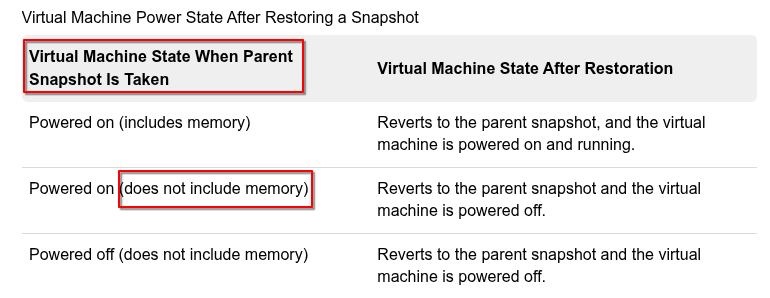
An administrator has a requirement to revert a running virtual machine to a previous snapshot after a failed attempt to upgrade an application. When the administrator originally took the snapshot, the following choices in the Take Snapshot dialog were made:
- Snapshot the virtual machine’s memory = false
- Quiesce guest file system = false
What will be the result of the administrator selecting the ‘Revert to Latest Snapshot’ option to return the virtual machine to a previous snapshot? (Choose two.)
-
A. The virtual machine will be restored to the parent snapshot. -
B. The virtual machine will be restored in a powered off state. - C. The virtual machine will be restored to the child snapshot.
- D. The virtual machine will be restored in a powered on state.
- E. The virtual machine will be restored in a suspended state.
Question 4
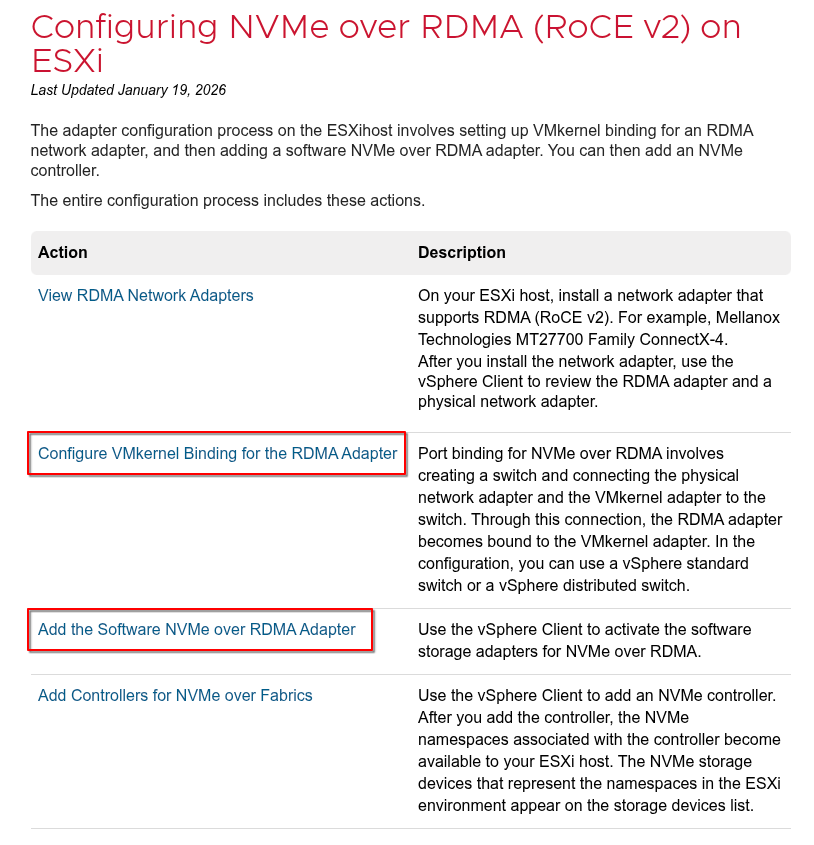
An administrator is tasked with configuring remote direct memory access (RDMA) over Converged Ethernet v2 (RoCE v2).
Which two types of adapters must the administrator configure? (Choose two.)
- A. Paravirtual RDMA adapter.
-
B. RDMA network adapter. - C. Software iSCSi adapter.
- D. Fibre Channel over Ethernet (FCoE) adapter.
-
E. Software NVMe over RDMA storage adapter.
Question 5
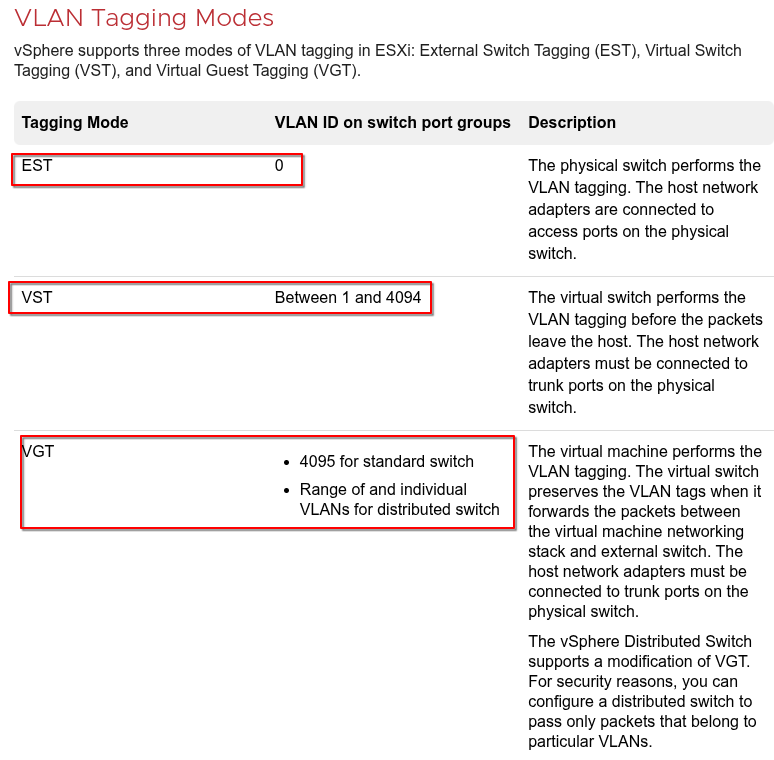
An administrator is asked to segregate virtual machine (VM) traffic by VLAN on a vSphere standard switch.
The following requirements must be met:
- VLAN ID on the switch port group must be 4095.
- VLAN tagging must be done at the VM level.
Which tagging mode is required?
- A. External Switch Tagging (EST).
- B. None.
-
C. Virtual Guest Tagging (VGT) - D. Virtual Switch Tagging (VST)
Question 6
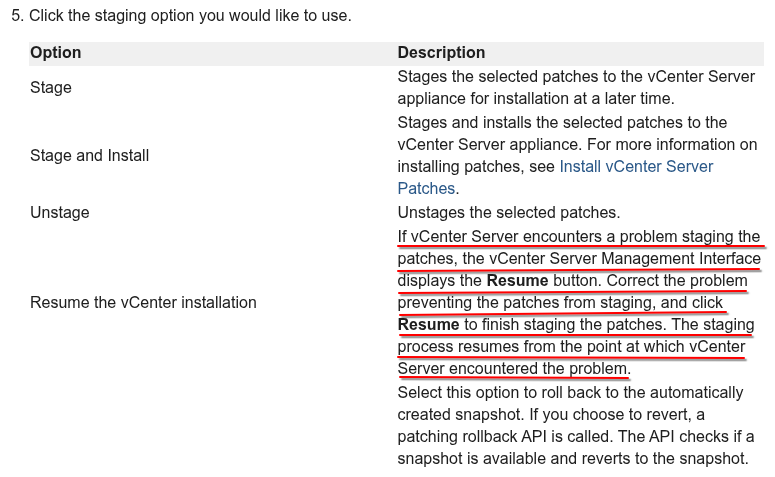
During the staging of a patch on a vCenter Server Appliance, an error was encountered and the process stopped. An administrator resolved the root cause and is ready to continue with the staging of the patch.
From the vCenter Management Interface, which action should the administrator take to continue the process from the point at which the error occurred?
- A. Use the Stage and Install option to resume the staging.
-
B. Use the Resume option to resume the staging. - C. Use the Unstage option to restart the staging.
- D. Use the Stage Only option to restart the staging.
Question 7
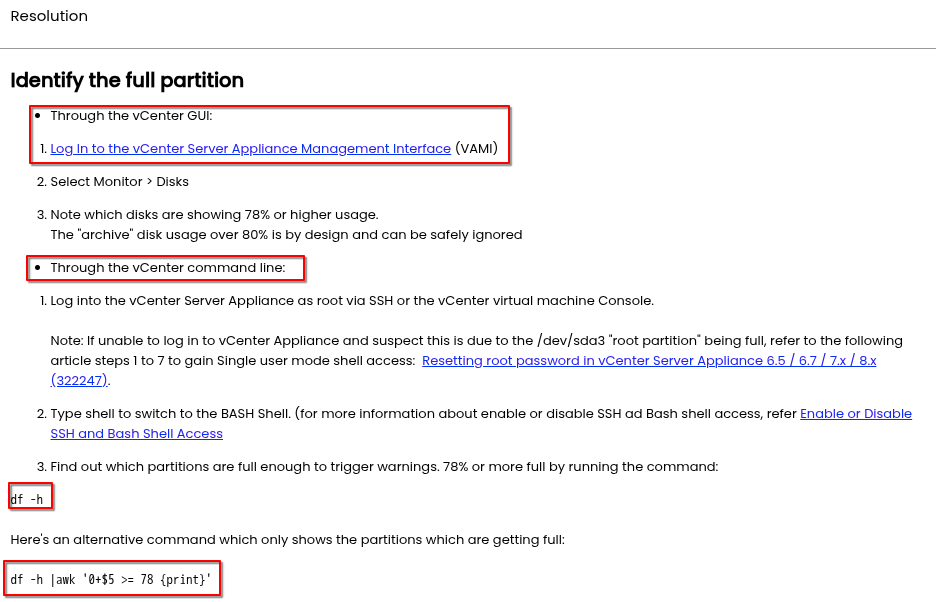
An administrator notices a performance issue in VMvvare vCenter To try and understand more about the performance issue, the administrator needs to gather more information about the vCenter database to eliminate a potential disk space issue.
Which two tools can the administrator use? (Choose two.)
-
A. vCenter Management Interface (VAMI). - B. Perfmon.
-
C. df. - D. esxtop.
- E. vSphere Client.
Question 8
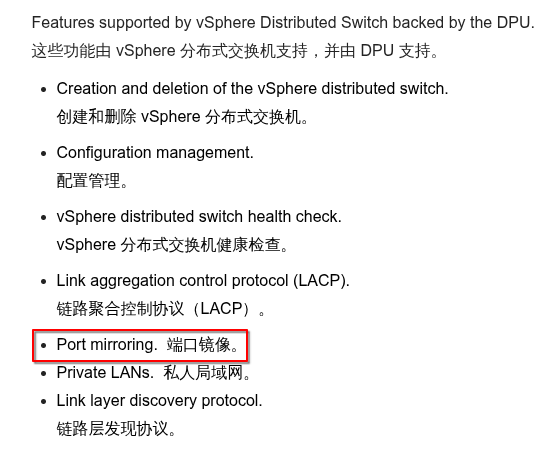
Which three features are only available when using vSphere Distributed Switches instead of vSphere Standard Switches? (Choose three.)
- A. 802.1Q tagging.
-
B. Port mirroring. -
C. Netflow. -
D. Configuration backup and restore. - E. IPv6 support.
- F. IPv4 support.
解答和参考链接
References
https://techdocs.broadcom.com/us/en/vmware-cis/vsphere/vsphere/8-0/vsphere-networking/basic-networking-with-vnetwork-distributed-switches/network-offloads-capability.html 配置 vSphere 分布式交换机的 NetFlow 设置 https://techdocs.broadcom.com/us/en/vmware-cis/vsphere/vsphere/8-0/vsphere-networking/monitoring-network-packets/configure-netflow-settings-with-the-vsphere-web-client.html 备份和恢复 vSphere 分布式交换机配置 https://techdocs.broadcom.com/us/en/vmware-cis/vsphere/vsphere/8-0/vsphere-networking/networking-backup-and-restore/exporting-importing-and-restoring-vsphere-distributed-switch-configurations.html#GUID-BE48C292-F222-4095-BCF8-D6444A785E16-en
Question 9
An administrator needs to consolidate a number of physical servers by migrating the workloads to a software-defined data center solution.
Which VMware solution should the administrator recommend?
- A. VMware Horizon.
- B. VMware vSAN.
-
C. VMware vSphere. - D. VMware.
解答和参考链接
Explanation
Option C is correct because VMware vSphere is the solution that provides a software-defined data center platform that can consolidate physical servers by migrating the workloads to virtual machines.
Question 10
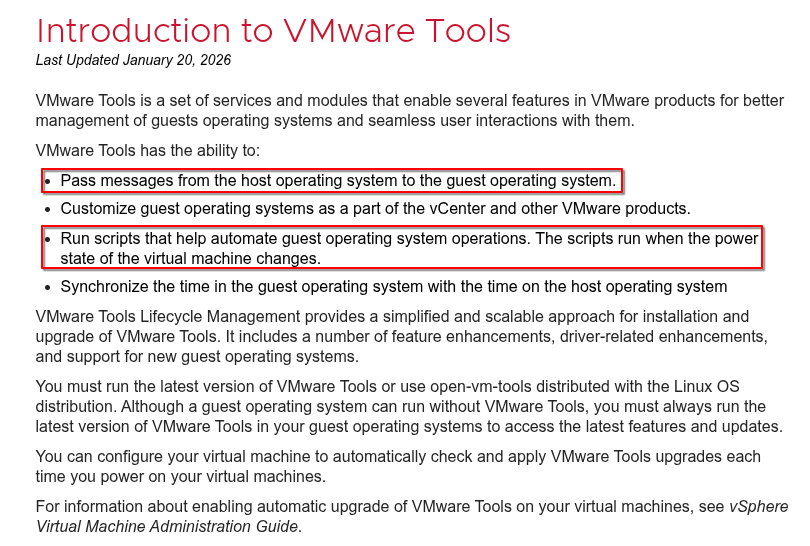
What are two uses cases for VMware Tools? (Choose two.)
- A. Time synchronization with an NTP server.
-
B. Direct deployment of the Aria Automation Config minion - C. Share folders between ESXi hosts and guest OS file systems.
-
D. Ability to shutdown a virtual machine remotely. - E. Support for unsupported network device drivers.
Question 11
An administrator is configuring vSphere Lifecycle Manager to install patches to a vSphere cluster. The cluster runs workload virtual machines (VMs) that are incompatible with vSphere vMotion, and therefore cannot be live migrated between hosts during the installation of the patches.
Which configuration in vSphere Lifecycle Manager will allow the administrator to reduce the downtime associated with the patching operation without migrating the VMs?
- A. Enable Distributed Power Management (DPM) and set the VM power state to the suspend to disk option.
- B. Enable Quick Boot and set the VM power state to the suspend to disk option.
- C. Enable vSphere High Availability (HA) admission control and set the VM power state to the suspend to memory option.
-
D. Enable Quick Boot and set the VM power state to the suspend to memory option.
解答和参考链接
References
配置 vSphere 生命周期管理器以实现快速升级 https://techdocs.broadcom.com/us/en/vmware-cis/vsphere/vsphere/8-0/managing-host-and-cluster-lifecycle/configuring-vlcm-remediation-settings-1/fast-upgrades.html
Question 12
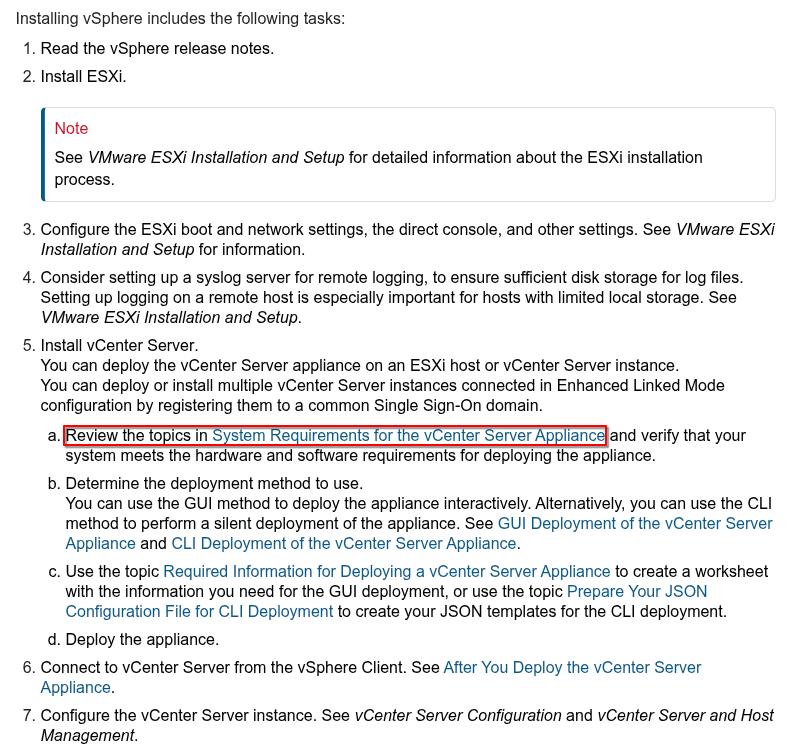
Which step is completed during Stage 1 of the vCenter Server Appliance deployment?
- A. Join a vCenter Single Sign-On domain.
- B. Create a new vCenter Single Sign-On domain.
-
C. Select the deployment size. - D. Configure SSH access.
Question 13
Refer to the exhibit.
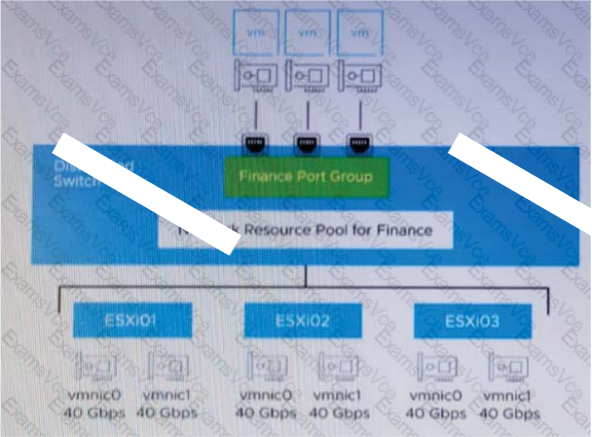 An administrator set up the following configuration:
- The distributed switch has three ESXi hosts, and each host has two 40 Gbps NICs.
- The amount of bandwidth reserved for virtual machine (VM) traffic is 6 Gbps. The administrator wants to guarantee that VMs in the Finance distributed port group can access 50 percent of the available reserved bandwidth for VM traffic.
Given this scenario, what should the size (in Gbps) of the Finance network resource pool be?
-
A. 18. - B. 80.
- C. 36.
- D. 120.
Question 14
An administrator is tasked with configuring certificates for a VMware software-defined data center (SDDC) based on the following requirements:
- All certificates should use certificates trusted by the Enterprise Certificate Authority (CA).
- The solution should minimize the ongoing management overhead of replacing certificates.
Which three actions should the administrator take to ensure that the solution meets corporate policy? (Choose three.)
- A. Replace the VMware Certificate Authority (VMCA) certificate with a self-signed certificate generated from the VMware Certificate Authority (VMCA).
-
B. Replace the machine SSL certificates with custom certificates generated from the Enterprise CA. - C. Replace the machine SSL certificates with trusted certificates generated from the VMware Certificate Authority (VMCA).
-
D. Replace the VMware Certificate Authority (VMCA) certificate with a custom certificate generated from the Enterprise CA. -
E. Replace the solution user certificates with custom certificates generated from the Enterprise CA. - F. Replace the solution user certificates with trusted certificates generated from the VMware Certificate Authority (VMCA).
Question 15
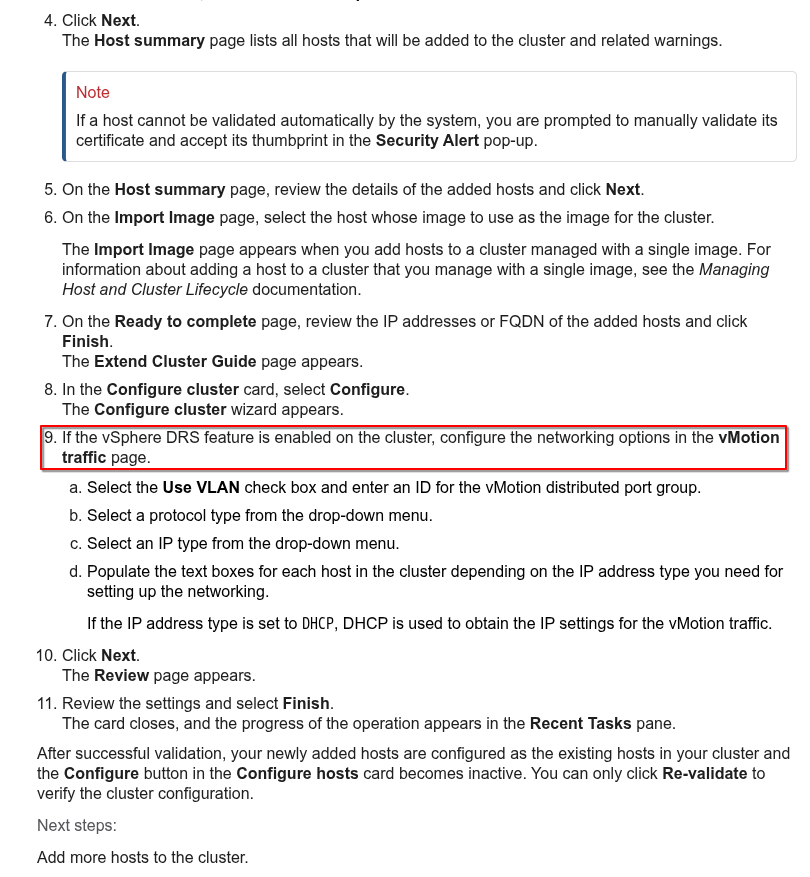
An administrator is completing the configuration of a new vSphere cluster and has enabled vSphere High Availability (HA) and vSphere Distributed Resource Scheduler (DRS).
After adding the ESXi hosts to the cluster, which networking information will the administrator be prompted to provide when using the Cluster Quickstart workflow?
-
A. vMotion networking. - B. Management networking.
- C. vSAN networking.
- D. Virtual machine networking.
Question 16
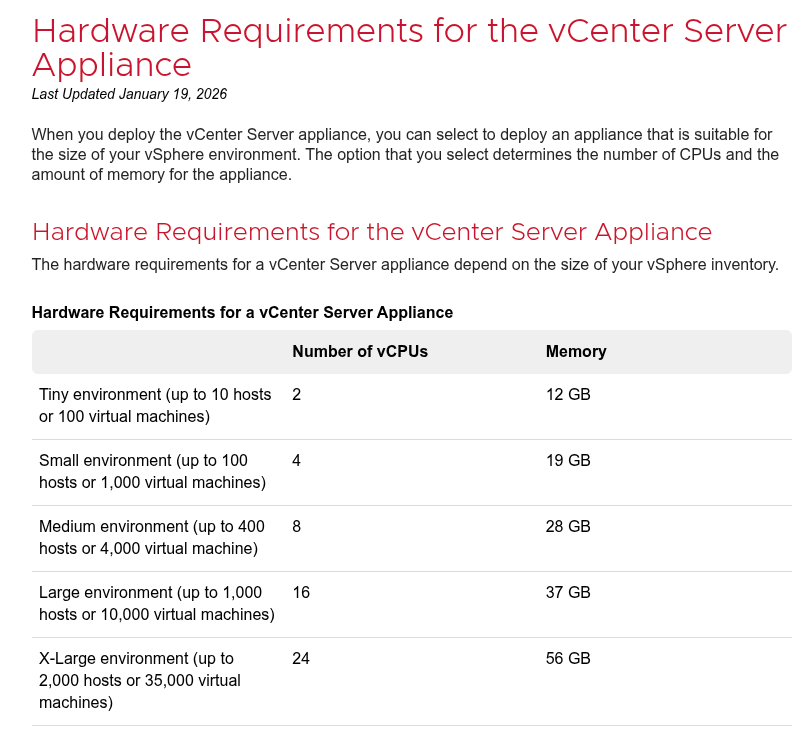
An administrator Is looking to deploy a new VMware vCenter Instance. The current environment consists of 75 hosts and is expected to grow up to 100 hosts over the next three years.
Which deployment size should the administrator select?
- A. Medium.
- B. Tiny.
- C. Large.
-
D. Small.
Question 17
An administrator is tasked with adding two additional hosts into an existing production vSphere cluster to support the need for additional capacity.
The vSphere cluster currently has four identically configured ESXi hosts (esxO1 esx02 esx03 and esx04) that utilize Intel Skylake-based CPUs. The two new hosts (esx05 and esx06) are configured identically in terms of memory and storage to the existing hosts, but utilize Intel Ice Lake-based CPUs.
The administrator must ensure that:
- Any virtual machine migrates to any of the six ESXi hosts running in the cluster.
- There is no virtual machine downtime during the process of adding the new hosts.
Which step should the administrator take to meet these requirements?
- A. Create a new vSphere cluster with Enhanced vMotion Compatibility (EVC) enabled and move all hosts into A’ the new cluster
- B. Create a new vSphere cluster and move only three hosts into the new cluster.
-
C. Configure Enhanced vMotion Compatibility (EVC) mode on the existing cluster and add the two new hosts into the cluster. - D. Create a new vSphere cluster with vSphere High Availability (HA) enabled and move all hosts into the new cluster.
解答和参考链接
Explanation The step that the administrator should take to meet these requirements is to configure Enhanced vMotion Compatibility (EVC) mode on the existing cluster and add the two new hosts into the cluster.
EVC mode allows migration of virtual machines between different generations of CPUs by masking unsupported processor features.EVC mode can be enabled on an existing cluster without affecting powered-on virtual machines.
References
https://blogs.vmware.com/cloud-foundation/2019/06/11/enhanced-vmotion-compatibility-evc-explained/
Question 18
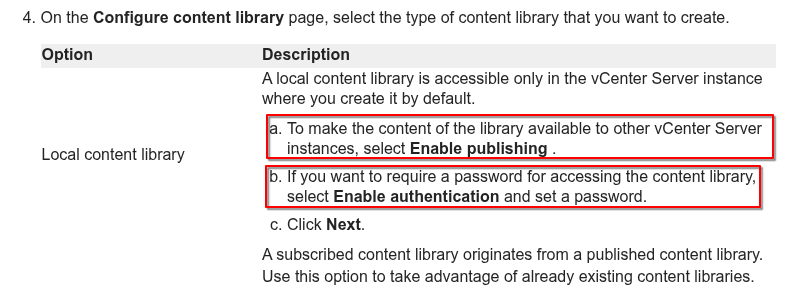
An administrator is creating a content library to manage VM templates and ISO images. The administrator wants to password-protect the images and templates and share them with a remote site.
Which two tasks must the administration perform when creating the content library? (Choose two.)
-
A. Publish the local content library. - B. Enable the security policy.
- C. Create a subscribed content library.
- D. Select an NFS datastore.
-
E. Enable authentication.
Question 19
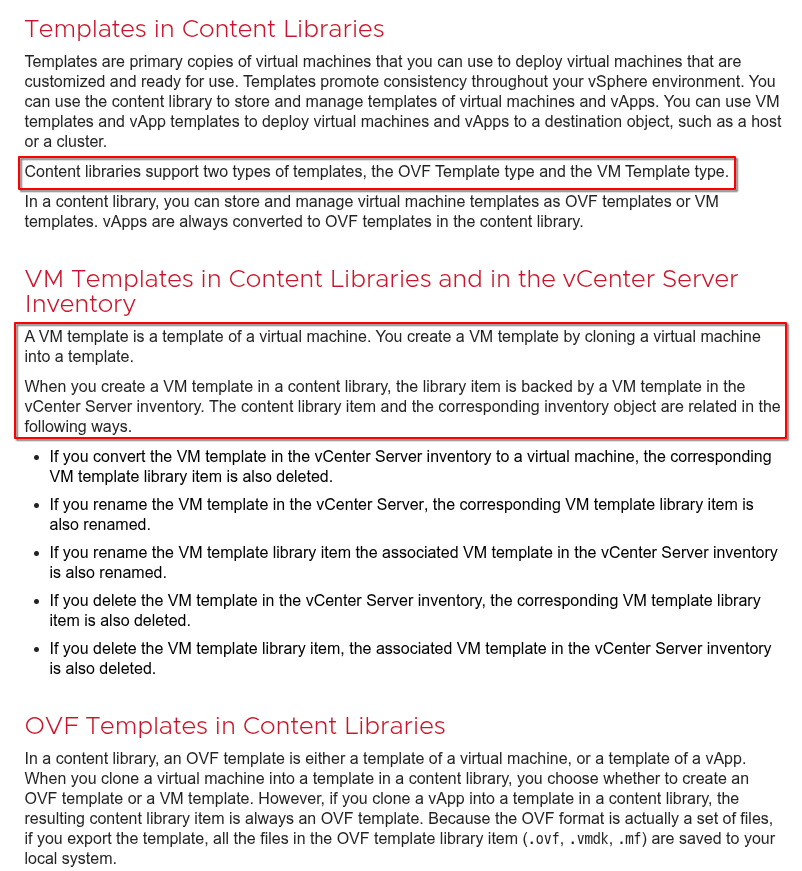
An administrator wants to create virtual machine (VM) templates and store them in a content library. The administrator would like to use the content library to manage different versions of these templates so that reverting to an earlier version is an option.
How should the administrator create these templates?
-
A. Select a VM in the vCenter inventory.Clone the VM to the content library as a VM template type. - B. Select a VM template in the vCenter inventory. Clone the template to the content library.
- C. Export a VM in the vCenter inventory to an OVF template. Import the OVF template into the content library.
- D. Convert a VM to a template in the vCenter inventory.Clone the template to the content library.
Question 20
An administrator has been notified that a number of hosts are not compliant with the company policy for time synchronization.
The relevant portion of the policy states:
All physical servers must synchronize timewith an external time source that isaccurate to the microsecond.
Which step should the administrator take to ensure compliance with the policy?
- A. Ensure that each vCenter Server Appliance is configured to use a Network Time Protocol (NTP) source.
-
B. Ensure that each ESXi host is configured to use a Precision Time Protocol (PTP) source. - C. Ensure that each ESXi host is configured to use a Network Time Protocol (NTP) source.
- D. Ensure that each vCenter Server Appliance is configured to use a Precision Time Protocol (PTP) source.
Question 21
An administrator is tasked with migrating a single virtual machine (VM) from an existing VMware vCenter to a secure environment where corporate security policy requires that all VMs be encrypted. The secure environment consists of a dedicated vCenter instance with a 4-node vSphere cluster and already contains a number of encrypted VMs.
Which two steps must the administrator take to ensure the migration is a success? (Choose two.)
-
A. Ensure that the source and destination vCenter instances share the same Key Management Server (KMS). - B. Ensure that Encrypted vMotion Is turned off for the VM.
-
C. Ensure that the VM is encrypted before attempting the migration. - D. Ensure that the VM is powered off before attempting the migration.
- E. Ensure that the source and destination vCenter Servers have a different Key Management Server (KMS).
解答和参考链接
Explanation To ensure a successful migration of an encrypted VM to a secure environment, the administrator needs to ensure that the source and destination vCenter instances share the same Key Management Server (KMS), which provides encryption keys for both environments; and ensure that the VM is encrypted before attempting the migration, which allows preserving its encryption status during vMotion.
References
https://techdocs.broadcom.com/us/en/vmware-cis/vsphere/vsphere/8-0/vsphere-security.html
Question 22
An administrator is investigating reports of users experiencing difficulties logging into a VMware vCenter instance using LDAP accounts.
Which service should the administrator check as part of troubleshooting?
- A. vSphere Authentication Proxy Service.
- B. Lookup Service.
-
C. Identity Management Service. - D. VMware Authentication Framework Daemon.
解答和参考链接
Explanation Identity Management Service is the service that handles authentication requests from LDAP accounts and other identity sources in vCenter Server.
Question 23
An administrator is investigating user logon failures for a VMware vCenter instance.
Where can the administrator find log files containing information related to user login activities?
- A. On the vCenter Management Interface.
- B. On the ESXi host using the Direct Console User Interface (®).
-
C. On the vCenter Server Appliance. - D. In the vSphere Client when viewing the vCenter virtual machine.
解答和参考链接
Explanation The administrator can find log files containing information related to user login activities on the vCenter Server Appliance, which is a preconfigured Linux-based virtual machine that runs all vCenter Server services.
The log files are located in /var/log/vmware/vmware-vpx/vpxd.log and /var/log/vmware/sso/ssoAdminServer.log directories.
Question 24
An administrator plans to bring VMware vCenter offline in order to perform hardware mainte-nance on the host where the vCenter Server Appliance is running.
Which vSphere feature must be configured to ensure that vCenter users experience minimal downtime?
- A. vSphere Distributed Resource Scheduler.
- B. Hybrid Linked Mode.
-
C. vCenter Server High Availability. - D. Enhanced Linked Mode.
Question 25
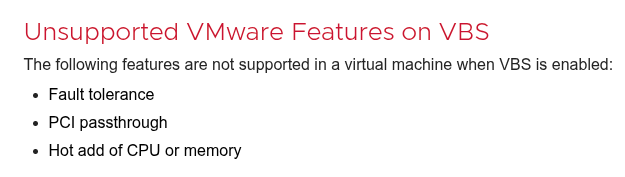
Which three vSphere features are still supported for Windows-based virtual machines when enabling vSphere’s-virtualization-based security feature? (Choose three.)
-
A. vSphere vMotion. - B. PCI passthrough.
-
C. vSphere High Availability (HA). - D. vSphere Fault Tolerance.
-
E. vSphere Distributed Resources Scheduler (DRS). - F. Hot Add of CPU or memory.
Question 26
An administrator is tasked with deploying a new on-premises software-defined data center (SDDC) that will contain a total of eight VMware vCenter instances.
The following requirements must be met:
- All vCenter instances should be visible in a single vSphere Client session.
- All vCenter inventory should be searchable from a single vSphere Client session.
- Any administrator must be able to complete operations on any vCenter instance using a single set of credentials.
What should the administrator configure to meet these requirements?
- A. Two Enhanced Linked Mode groups consisting of four vCenter instances each in a Single Sign-On domain.
- B. A single Hybrid Linked Mode group consisting of four vCenter instances each in a Single Sign-On domain.
-
C. A single Enhanced Linked Mode group consisting of eight vCenter instances in one Single Sign-On domain. - D. A single Hybrid Linked Mode group consisting of eight vCenter instances in one Single Sign-On domain.
解答和参考链接
Explanation To meet the requirements of viewing and searching all vCenter instances and inventory with a single vSphere Client session and a single set of credentials, the administrator needs to configure a single Enhanced Linked Mode group consisting of eight vCenter instances in one Single Sign-On domain.
References
Question 27
After adding a new vSphere ESXi host with identical hardware configuration to an existing vSphere cluster, which task would an administrator complete prior to checking the compliance with an existing host profile?
-
A. Attach the host profile to the new host. - B. Duplicate the host profile.
- C. Copy the host settings from the new host.
- D. Import the host profile.
解答和参考链接
Explanation The task that should be completed prior to checking the compliance with an existing host profile is to attach the host profile to the new host, which allows applying the configuration template of the reference host to the new host.
References
Question 28
An administrator creates a new corporate virtual machine (VM) template every month to include all of the latest patches. The administrator needs to ensure that the new VM template is synchronized from the primary data center site (London) to two secondary data center sites (Tokyo and New York). The administrator is aware that datastore space is limited within the secondary data center sites. The administrator needs to ensure that the VM template is available in the secondary sites the first time a new virtual machine is requested.
Which four steps should the administrator take to meet these requirements? (Choose four.)
-
A. Create a new published content library at the primary site. - B. Add the virtual machine template to the subscribed content library.
- C. Create a new published content library in each secondary site.
-
D. Create a new subscribed content library in each secondary site. -
E. Configure the subscribed content library to download content when needed. -
F. Configure each subscribed content library to download content immediately. - G. Add the virtual machine template to the published content library.
解答和参考链接
Explanation
- To meet the requirements of synchronizing and protecting images and templates with limited datastore space, the administrator needs to create a new published content library at the primary site, which makes it available for subscription by other vCenter Server instances;
- create a new subscribed content library in each secondary site, which allows accessing content from a published content library;
- configure the subscribed content library to download content when needed, which saves datastore space by only downloading content on demand;
- and add the virtual machine template to the published content library, which makes it available for other hosts to use.
References
Question 29
An administrator is preparing to perform an update to vSphere clusters that are running vSAN. The administrator wants to ensure that the following requirements are met as part of the update:
- All hosts in the cluster are updated with the same software.
- The firmware versions on the hosts are updated
- The new software versions are checked for compliance against the vSAN Hardware Compatibility List.
Which three steps should the administrator take to meet these requirements? (Choose three.)
-
A. Configure vSphere Lifecycle Manager with an image for the cluster. -
B. Register the vendor hardware management system as a vCenter Server extension. - C. Download the firmware updates from the VMware website
- D. Download the firmware updates from the vendor website.
-
E. Run a hardware compatibility check using vSphere Lifecycle Manager. - F. Configure vSphere Lifecycle Manager with a baseline for the cluster.
解答和参考链接
Explanation The administrator should take these three steps to perform an update to vSphere clusters that are running vSAN:
- Configure vSphere Lifecycle Manager with an image for the cluster, which allows the administrator to specify the desired ESXi version and firmware for the hosts in the cluster.
- Register the vendor hardware management system as a vCenter Server extension, which allows the administrator to update the firmware on the hosts using vSphere Lifecycle Manager. The vendor hardware management system can also provide the firmware updates to vSphere Lifecycle Manager, so there is no need to download them from the vendor website separately.
- Run a hardware compatibility check using vSphere Lifecycle Manager, which verifies that the new software and firmware versions are compatible with the vSAN Hardware Compatibility List.
References
https://techdocs.broadcom.com/us/en/vmware-cis/vsphere/vsphere/8-0/managing-host-and-cluster-lifecycle/about-vsphere-lifecycle-manager-new.html https://techdocs.broadcom.com/us/en/vmware-cis/vsphere/vsphere/8-0/managing-host-and-cluster-lifecycle/hardware-compatibility-checks.html
Question 30
An administrator is responsible for performing maintenance tasks on a vSphere cluster. The cluster has the following configuration:
- Identically configured vSphere ESXi hosts (esx01, esx02, esx03 and esx04).
- All workloads are deployed into a single VMFS datastore provided by the external storage array.
- vSphere High Availability (HA) has not been enabled.
- vSphere Distributed Resource Scheduler (DRS) has not been enabled.
Currently, a critical production application workload (VM1) is running on esx01.
Given this scenario, which two actions are required to ensure VM1 continues to run when esx01 is placed into maintenance mode? (Choose two.)
-
A. Fully automated DRS must be enabled on the cluster so that VM1 will be automatically migrated to another host within the cluster when esx01 is placed into maintenance mode. - B. VM1 must be manually shut down and cold migrated to another host within the cluster using vSphere vMotion before esx01 is placed into maintenance mode.
- C. vSphere HA must be enabled on the cluster so that VM1 will be automatically migrated to another host within the cluster when esx01 is placed into maintenance mode.
-
D. VM1 must be manually live migrated to another host within the cluster using vSphere vMotion before esx01 is placed into maintenance mode. - E. VM1 must be manually migrated to another host within the cluster using vSphere Storage vMotion before esx01 is placed into maintenance mode.
解答和参考链接
Explanation Two actions that are required to ensure VM1 continues to run when esx01 is placed into maintenance mode are enabling fully automated DRS on the cluster, which allows balancing the workload across hosts and migrating VMs without user intervention; and manually live migrating VM1 to another host within the cluster using vSphere vMotion, which allows moving a running VM without downtime.
Question 31
An administrator remotely deploys VMware ESXi using an out of band management connection and now needs to complete the configuration of the management network so that the host is accessible through the vSphere Host Client.
The following information has been provided to complete the configuration:
- Host FQDN esxi01.corp.local
- Management VLAN ID: 10
- DHCP: No
- Management IP Address: 172.16.10.101/24
- Management IP Gateway: 172.16.10.1
- Corporate DNS Servers: 172 16.10.5, 172.16.10..6
- DNS Domain: corp.local
In addition, all host configurations must also meet the following requirements:
- The management network must use only IPv4 network protocols.
- The management network must be fault tolerant.
Which four high level tasks should the administrator complete in the Direct Console User Interface (DCUI) in order to meet the requirements and successfully log into the vSphere Host Client? (Choose four.)
-
A. Set the value of the VMware ESXi Management Network VLAN ID to 10. -
B. Configure at least two network adapters for the VMware ESXi Management Network. -
C. Update the VMware ESXi Management Network IPv4 configuration to use a static IPv4 address. - D. Create a DNS A Record for the VMware ESXi host on the corporate DNS servers.
-
E. Disable IPv6 for the VMware ESXi Management Network. - F. Restore the original Management vSphere Standard Switch.
- G. Update the VMware ESXi Management Network DNS configuration to use the corporate DNS servers for names resolution.
Question 32
Which feature would allow for the non-disruptive migration of a virtual machine between two clusters in a single VMware vCenter instance?
-
A. vSphere vMotion - B. Cross vCenter Migration
- C. vSphere Storage vMotion
- D. vSphere Fault Tolerance
解答和参考链接
Explanation vSphere vMotion allows for the non-disruptive migration of a virtual machine between two clusters in a single vCenter instance, as long as there is shared storage and network connectivity between the clusters.
vMotion is used to move the VM to a different cluster within the same vCenter. This only works if both clusters share the same storage. If they don’t you also need to perform a Storage vMotion. Cross vCenter Migration is only used to migrate to a different vCenter.
Question 33
An administrator needs to provide encryption for workloads within an existing vSphere cluster. The following requirements must be met:
- Workloads should be encrypted at rest.
- Encrypted workloads must automatically be encrypted during transit.
- Encryption should not require any specific hardware.
What should the administrator configure to meet these requirements?
- A. Encrypted vSphere vMotion
- B. Unified Extensible Firmware Interface (UEFI) Secure Boot
- C. Host Encryption
-
D. VM Encryption
解答和参考链接
Explanation The feature that should be configured to provide encryption for workloads within an existing vSphere cluster without requiring any specific hardware is VM Encryption, which allows encrypting VMs at rest and during vMotion.
Question 34
Refer to the exhibit.
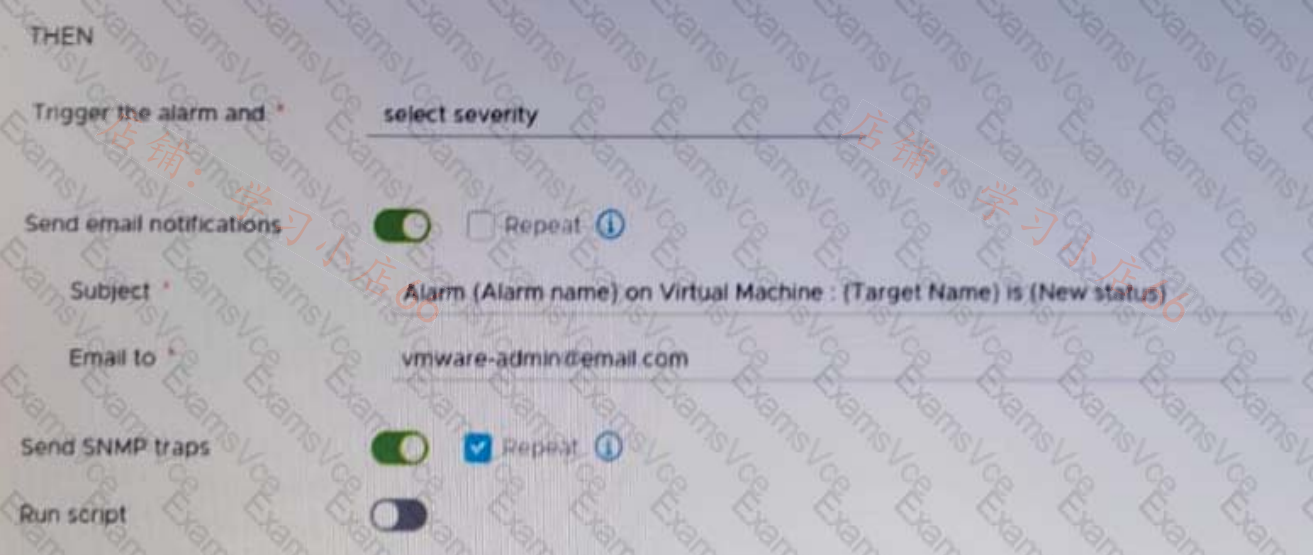
After updating a predefined alarm on VMware vCenter, an administrator enables email notifications as shown in the attached alarm; however, notifications are NOT being sent.
Where must the mail server settings be configured by the administrator to resolve this issue?
- A. In the ESXi host system config.
- B. In the alarm rule definitions.
-
C. In the vCenter settings in the vSphere Client. - D. in the vCenter Management Interface.
解答和参考链接
- Option C is correct because it allows the administrator to configure the mail server settings in the vCenter settings in the vSphere Client, which are required for sending email notifications for alarms.
- Option A is incorrect because it configures the mail server settings on an ESXi host system, which are not used for sending email notifications for alarms.
- Option B is incorrect because it configures the alarm rule definitions, which arealready enabled in the exhibit.
- Option D is incorrect because it configures the vCenter Management Interface,which is not used for sending email notifications for alarms.
References:
Question 35
An administrator needs better performance and near-zero CPU utilization from the ESXI hosts for networking functions and processing. The administrator creates a new vSphere Distributed Switch and enables network offloads compatibility.
Which solution would help achieve this goal?
- A. VSphere Distributed Services Engine
-
B. Data Processing Units (DPUs) - C. vSphere Network I/O Control
- D. Universal Passthrough version 2
解答和参考链接
Explanation
The solution that would help achieve better performance and near-zero CPU utilization from the ESXi hosts for networking functions and processing is Data Processing Units (DPUs), which are specialized processors that offload network services from the CPU and provide hardware acceleration.
Question 36
An administrator has configured Storage I/O Control (SIOC) on a Virtual Machine File System (VMFS) datastore.
- The datastore supports 30,000 IOPS
- Storage I/O Control has been set to manual
- Storage I/O Control is triggered when latency hits 30 ms
The datastore contains 3 virtual machines (VMs)
- A gold tier VM
- A silver tier VM
- A bronze tier VM
Assuming the datastore latency does not exceed 29ms, what is the maximum number of IOPS the bronze tier VM is entitled to?
-
A. 30,000 - B. 20,000
- C. 10.000
- D. 5,000
解答和参考链接
Explanation
The bronze tier VM is entitled to 30,000 IOPS, which is the maximum number of IOPS that the datastore supports. Storage I/O Control (SIOC) does not limit the IOPS of any VM unless the datastore latency exceeds the threshold, which is 30 ms in this case. Therefore, as long as the datastore latency is below 29 ms, the bronze tier VM can use up to 30,000 IOPS.
References:
https://docs.vmware.com/en/VMware-vSphere/7.0/com.vmware.vsphere.resmgmt.doc/GUID-7686FEC3-1FAC-
Question 37
A VMkernel port is labelled PROD01 and uses the default TCP/IP stack. Currently, this VMkernel port is configured for supporting live virtual machine (VM) migrations.
Which configuration change should the administrator make to isolate live VM migration traffic from other network traffic?
-
A. Remove PROD01 and create a new VMkernel port and set the TCP/IP stack to vSphere vMotion. - B. Remove PROD01 and create a new VMkernel port with the TCP/IP stack set to provisioning.
- C. Create a new VMkernel port and set the TCP/IP stack to provisioning.
- D. Modify PROD01 by changing the TCP/IP stack to vSphere vMotion.
解答和参考链接
Explanation Select a TCP/IP stack from the list. Once you set a TCP/IP stack for the VMkernel adapter, you cannot change it later.
If you select the vMotion or the Provisioning TCP/IP stack, you will be able to use only these stacks to handle vMotion or Provisioning traffic on the host.
All VMkernel adapters for vMotion on the default TCP/IP stack are disabled for future vMotion sessions.
If you set the Provisioning TCP/IP stack, VMkernel adapters on the default TCP/IP stack are disabled for operations that include Provisioning traffic, such as virtual machine cold migration, cloning, and snapshot migration.
References:
Question 38
Refer to the exhibit.
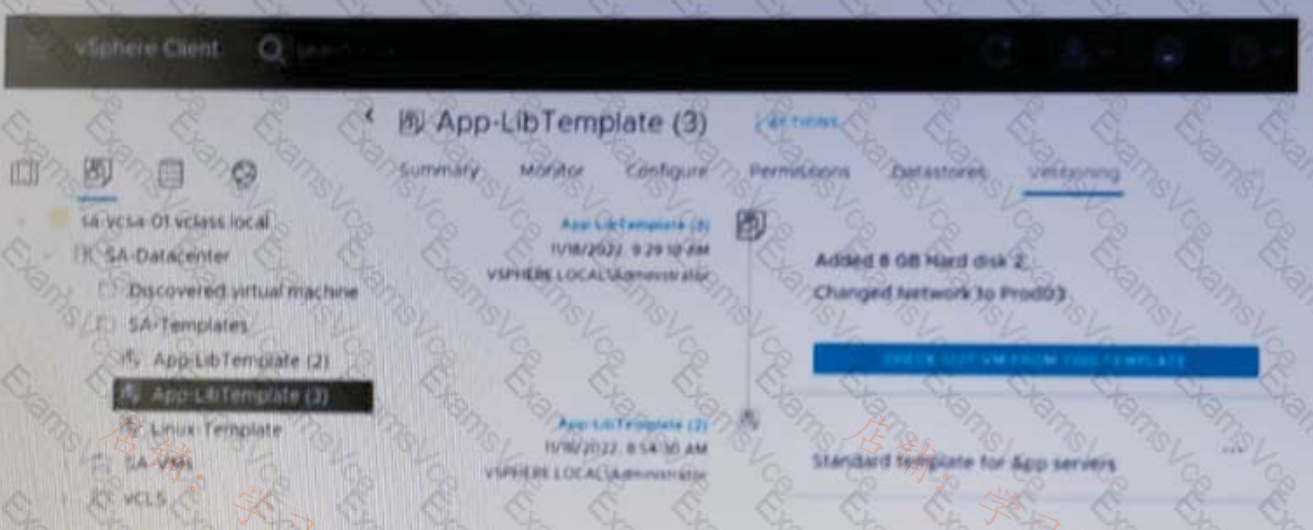 Given the configuration shown in the exhibit, what should the administrator do if the latest VM template contains changes that are no longer needed?
- A. Delete App-LibTemplate (2)
- B. Revert to App-LibTernplate (2)
-
C. Delete App-LibTemplate (3) - D. Check out App-LibTemplate (3)
解答和参考链接
Explanation Deleting App-LibTemplate (3) will remove the changes that are no longer needed and revert to the previous version of the template.
Question 39
An administrator successfully installs VMware ESXi onto the first host of a new vSphere cluster but makes no additional configuration changes. When attempting to log into the vSphere Host Client using the Fully Qualified Domain Name (FQDN) of the host, the administrator receives the following error message:
“Server Not Found - We can’t connect to the server at esxi101.corp.local.”
The following information has been provided to complete the configuration:
- Host FQDN esxi101.corp.local
- Management VLAN ID: 10
- DHCP: No
- Management IP Address: 172.16 10.101/24
- Management IP Gateway: 172.16.10.1
- Corporate DNS Servers: 172.16 10.5,172.16.10.6
- DNS Domain: corp.local
In addition, all host configurations must also meet the following requirements:
- The management network must use only IPv4 network protocols.
- The management network must be fault tolerant
Which three high level tasks should the administrator complete, at a minimum, in order to successfully log into the vSphere Host Client using the FQDN for esxi101 and complete the configuration? (Choose three.)
-
A. Ensure a DNS A Record is created for the VMware ESXi host on the corporate DNS servers. - B. Update the VMware ESXi Management Network DNS configuration to use the corporate DNS servers for names resolution
-
C. Update the VMware ESXi Management Network IPv4 configuration to use a static a IPv4 address - D. Configure at least two network adapters for the VMware ESXi Management Network
-
E. Set the value of the VMware ESXi Management Network VLAN ID to 10 - F. Disable IPv6 for the VMware ESXi Management Network
Question 40
Refer to the exhibit.
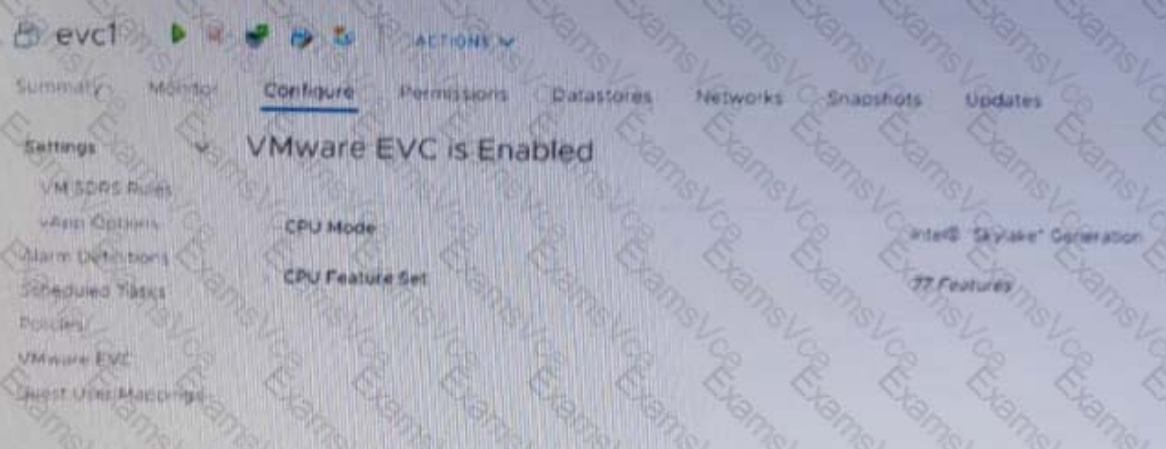 An administrator is tasked with adding new capacity to an existing software-defined data center (SDDC).
- The SDDC currently hosts two vSphere clusters (ClusterA and ClusterB) with different CPU compatibilities.
- vSphere vMotion and vSphere Distributed Resource Scheduler (DRS) are currently in use in the SDDC.
- The new capacity will be implemented by provisioning four ESXi hosts running a new generation of Intel Skylake CPUs.
- All workload virtual machines (VMs) must support live migration to any cluster in the SDDC.
The administrator noticed the running critical ever virtual machine (VM) shown in the exhibit is not migrating using vSphere vMotion to the original Clusters A or B.
Which three steps must the administrator take to support this functionality? (Choose three.)
-
A. Power on the VM. - B. Disable the Enhanced vMotion Compatibility (EVC) on the VM.
- C. Reboot the VM.
-
D. Configure the Enhanced vMotion Compatibility (EVC) on vSphere Cluster A and B to support Intel Skylake. -
E. Power off the VM. - F. Configure the Enhanced vMotion Compatibility (EVC) on the VM to Intel Skylake.
Question 41
To keep virtual machines (VMs) up and running at all times in a vSphere cluster, an administrator would like VMs to be migrated automatically when the host hardware health status becomes degraded.
Which cluster feature can be used to meet this requirement?
- A. Predictive DRS
-
B. Proactive HA - C. vSphere HA Orchestrated Restart
- D. vSphere Fault Tolerance
解答和参考链接
Explanation Proactive HA is a cluster feature that can be used to migrate VMs automatically when the host hardware health status becomes degraded, before a failure occurs.
Question 42
What is the minimum network throughput in Gb/s for vSAN using the Express Storage Architecture (ESA)?
- A. 50
-
B. 25 - C. 1
- D. 10
解答和参考链接
| 特性 | vSAN OSA (Original) | vSAN ESA (Express) |
|---|---|---|
| 最低网络速率 | 1 Gb/s (Hybrid) / 10 Gb/s (AF) | 25 Gb/s |
| 推荐网络速率 | 10 Gb/s 或更高 | 100 Gb/s (为了获得最佳性能) |
| 支持的介质 | 混合 (磁盘+闪存) 或 全闪存 | 仅限 NVMe |
Question 43
An administrator needs to update a VMware vCenter instance to a newer minor release version. Due to restrictions within the environment, the vCenter instance does not have access to the Internet As a first step, the administrator downloads the required update on another machine.
What are the next steps the administrator must perform to complete the update?
- A. Place the update ISO file in a Virtual Machine File System (VMFS) datastore.Use the vSphere Client to select the update ISO file as the source for the update.
-
B. Mount the ISO update file to the CD-ROM drive of the vCenter instance.Use the vCenter Management Interface to select the CD-ROM as the source for the update. - C. Place the ISO update file in a folder accessible to the vCenter instance over HTTPS.Use the vCenter Management Interface to select the update file as the source for the update.
- D. Place the ZIP update file in a folder accessible to the vCenter instance over HTTPS.Use the vSphere Client to select the update file as the source for the update.
Question 44
An administrator must gracefully restart a virtual machine (VM) through the vSphere Client but the option is greyed out. The administrator has full administrative access on VMware vCenter and all the objects available in vCenter, but has no access to log onto the operating system.
Which action should the administrator take to meet the objective?
- A. Upgrade the virtual hardware
- B. Migrate the VM to another host
-
C. Install VMware Tools - D. Restart vCenter
解答和参考链接
Explanation
Installing VMware Tools will enable the graceful restart option for the virtual machine, as well as other features such as time synchronization and guest OS customization.
References:
Question 45
An administrator is adding a new ESXi host to an existing vSphere cluster. When selecting the cluster, the administrator Is unable to use the Cluster Quickstart workflow to add and configure the additional host.
What could be the root cause of this issue?
-
A. The administrator has previously dismissed the Cluster Quickstart workflow. - B. The administrator must manually add the host to the cluster before using the Cluster Quickstart workflow.
- C. The administrator has not been assigned the required permissions to use the Cluster Quickstart workflow.
- D. The administrator must enable the Cluster Quickstart workflow option in VMware vCenter.
解答和参考链接
Explanation
Option A is correct because it indicates that the administrator has previously dismissed the Cluster Quickstart workflow, which will prevent them from using it to add and configure an additional host. To use the Cluster Quickstart workflow again, the administrator must enable it in the cluster settings.
Option B is incorrect because the administrator does not need to manually add the host to the cluster before using the Cluster Quickstart workflow, as this is one of the steps in the workflow.
Option C is incorrect because the administrator does not need any special permissions to use the Cluster Quickstart workflow, as long as they have permissions to perform cluster operations.
Option D is incorrect because there is no option to enable the Cluster Quickstart workflow in VMware vCenter, as this is a feature of vSphere clusters.
Question 46
A vSphere cluster has the following vSphere Distributed Resource Scheduler (DRS) group configuration:
- Virtual machine (VM) group named DB
- Host groups named PROD11 and PROD55
The administrator wants to force the VMs in the DB group to run on the hosts in the PROD11 group.
However, if all the hosts in PROD55.
Which VM/Host rule must the administrator create to ensure that these requirements are met?
-
A. A preferential rule between the DB group and PROD11 group - B. A preferential rule between the DB group and the PROD55 group
- C. A preferential rule between the DB group and the PROD55 group
- D. A required rule between the DB group and the PROD11 group
解答和参考链接
Explanation Option A is correct because it allows the administrator to create a preferential rule between the DB group and PROD11 group, which will force the VMs in the DB group to run on the hosts in the PROD11 group if possible, but will allow them to run on the hosts in PROD55 group if necessary.
Option B is incorrect because it will create a preferential rule between the DB group and PROD55 group, which will force the VMs in the DB group to run on the hosts in PROD55 group if possible, which is not what the administrator wants.
Option C is incorrect because it is the same as option B. Option D is incorrect because it will create a required rule between the DB group and PROD11 group, which will force the VMs in the DB group to run only on the hosts in PROD11 group and not allow them to run on the hosts in PROD55 group if needed.
Question 47
An administrator decides to restore VMware vCenter from a file-based backup following a failed upgrade.
Which interface should the administrator use to complete the restore?
- A. Direct Console User Interface (DCUI)
- B. vCenter Management Interface (VAMI)
- C. vSphere Client
-
D. vCenter GUI Installer
Question 48
An administrator plans to update the Supervisor cluster and has noticed some of the Tanzu Kubemetes Grid clusters are running an incompatible version.
Which action must the administrator take before proceeding with the Supervisor cluster update?
- A. Update all Tanzu Kubernetes Grid clusters to the latest version prior to the Supervisor cluster update.
- B. No action is needed - Tanzu Kubernetes Grid clusters will be updated automatically as part of the update process.
- C. No action is needed - Incompatible Tanzu Kubernetes Grid clusters can be manually updated after the Supervisor cluster update.
-
D. Update incompatible Tanzu Kubernetes Grid clusters prior to the Supervisor cluster update.
Question 49
An administrator is planning to upgrade a VMware vCenter instance to version 8. It is currently integrated with the following solutions:
- VMware Aria Automation
- VMware Cloud Director
Which tool can the administrator use to run Interoperability reports before the upgrade process?
- A. sphere Update Manager
- B. VMware Aria Suite Lifecycle
-
C. vCenter Server Update Planner - D. vSphere Lifecycle Manager
解答和参考链接
Explanation The tool that can be used to run interoperability reports before upgrading a vCenter Server instance is vCenter Server Update Planner, which allows checking compatibility with other VMware products.
References:
Monitor Interoperability for the Current vCenter Server Version
Question 50
A vSphere environment is experiencing intermittent short bursts of CPU contention, causing brief production outages for some of the virtual machines (VMs). To understand the cause of the issue, the administrator wants to observe near real-time statistics for all VMs.
Which two vSphere reporting tools could the administrator use? (Choose two.)
-
A. Advanced Performance Charts - B. esxcli
- C. resxtop
- D. Overview Performance Charts
-
E. esxtop
解答和参考链接
Explanation
Advanced Performance Charts and esxtop are both vSphere reporting tools that can be used to observe near real-time statistics for all VMs. Advanced Performance Charts provides a graphical view of performance data, while esxtop is a command-line tool that provides more detailed information.
Question 51
An administrator is attempting to configure Storage I/O Control (SIOC) on five datastores within a vSphere environment. The administrator is being asked to determine why SIOC configuration completed successfully on only four of the datastores.
What are two possible reasons why the configuration was not successful? (Choose two.)
-
A. The datastore contains Raw Device Mappings (RDMs). - B. SAS disks are used for the datastore.
-
C. The datastore has multiple extents. - D. The datastore is using ISCSI.
- E. The administrator is using NFS storage.
解答和参考链接
Explanation
A. The datastore contains Raw Device Mappings (RDMs). (数据存储包含原始设备映射)
理由:SIOC 只能管理由 ESXi 主机通过 VMFS 文件系统调度和控制的流量。裸设备映射 (RDM)(尤其是物理模式的 RDM)允许虚拟机绕过 VMFS 直接与存储设备通信。由于 SIOC 无法监控或拦截这种直接的 I/O 流,因此包含 RDM 的数据存储不支持开启 SIOC。
C. The datastore has multiple extents. (数据存储具有多个扩展盘)
理由:VMware 明确规定,SIOC 不支持由多个 Extents(扩展) 组成的数据存储。如果一个 VMFS 数据存储是通过跨越多个 LUN(物理卷)创建的,SIOC 将无法在该卷上启用。
参考文档:
Manage Storage I/O Resources with vSphere https://techdocs.broadcom.com/us/en/vmware-cis/vsphere/vsphere/8-0/vsphere-resource-management/managing-storage-i-o-resources.html#GUID-7686FEC3-1FAC-4DA7-B698-B808C44E5E96-en
Question 52
A vSphere cluster has the following configuration:
- Virtual machines (VMs) are running Production and Test workloads
- vSphere Distributed Resource Scheduler (DRS) is enabled
- There are no resource pools in the cluster
Performance monitoring data shows that the Production workload VMs are not receiving their fully allocated memory when the vSphere cluster is fully utilized.
A combination of which two steps could the administrator perform to ensure that the Production VMs are always guaranteed the full allocation of memory? (Choose two.)
- A. Assign a custom memory share value to the resource pool containing the Production VMs.
-
B. Assign a memory reservation value to the resource pool containing the Production VMs. - C. Create a parent resource pool for the Production VMs.
-
D. Create a sibling resource pool for each of the Production and Test VMs. - E. Create a child resource pool for the Test VMs.
解答和参考链接
警告本解答由AI生成,仅供参考,请仔细甄别。
Explanation
D. Create a sibling resource pool for each of the Production and Test VMs (为生产和测试 VM 分别创建同级资源池)
理由:题目指出当前群集中没有资源池。为了对这两类性质不同的工作负载进行差异化管理,首先需要创建资源池。同级结构 (Sibling):在群集下创建两个平行的(同级)资源池(例如 “Production-Pool” 和 “Test-Pool”),可以将生产 VM 和测试 VM 物理隔离开来。这是实施后续资源保障步骤的前提。
B. Assign a memory reservation value to the resource pool containing the Production VMs (为包含生产 VM 的资源池分配内存预留值) 理由:预留 (Reservation) 是 vSphere 中唯一的“硬性保证”。
工作机制:当你在生产资源池上设置了内存预留(Reservation),无论群集多么拥挤,ESXi 都会确保物理内存中始终留出这部分空间给该池。由于题目要求“始终保证全额分配(always guaranteed the full allocation)”,只有 Reservation 能够提供这种绝对保证。
联动效应:通过在同级池结构中仅给生产池设置高额预留,即使测试池尝试争抢资源,也会因为生产池的“预留保护”而无法侵占生产环境的内存。
A. Assign a custom memory share value (分配自定义份额):
缺陷:份额 (Shares) 仅在资源竞争时表现为“优先级”。它是一种相对保证。如果群集资源极度匮乏,即使 Shares 很高,也无法像 Reservation 那样提供“全额(Full allocation)”的硬性承诺。
C. Create a parent resource pool (创建父资源池):
缺陷:单独创建一个父池而不进行切分或设置预留,无法解决生产和测试 VM 之间的资源争用问题。
E. Create a child resource pool for the Test VMs (为测试 VM 创建子资源池):
缺陷:仅限制测试环境(通常是通过 Limit)并不等同于给生产环境提供“保证”。
References:
Question 53
An administrator runs a two-node vSphere cluster, which contains two domain controller virtual machines(VMs). The administrator wants to ensure that VMs run on separate hosts without interfering with normal maintenance operations.
How should the administrator configure Distributed Resource Scheduler (DRS)?
- A. Create a ‘Must run Virtual Machines to Hosts’ anti-affinity rule.
- B. Create a ‘Virtual Machines to Virtual Machines’ anti-affinity rule.
- C. Create a ‘Virtual Machines to Virtual Machines’ dependency rule.
-
D. Create a 'Should run Virtual Machines to Hosts' anti-affinity rule.
解答和参考链接
警告本解答由AI生成,仅供参考,请仔细甄别。
场景需求:
集群中有两个节点(主机)。 有两个域控制器虚拟机(VM)。 要求这两个 VM 运行在不同的主机上,以避免单点故障。 同时不能干扰正常的维护操作(如进入维护模式、DRS 自动迁移等)。
规则类型分析:
“Must run”规则:是硬性规则,DRS 和 vMotion 会强制满足它,但在某些情况下(如主机进入维护模式)可能阻止正常操作,甚至导致虚拟机无法迁移。 “Should run”规则:是软性规则,DRS 会尽量满足,但在必要时(如维护、资源紧张)可以违反,从而不影响维护操作的灵活性。 反关联规则对象:
题目要求两个 VM 运行在不同主机上,所以应该是 Virtual Machines to Hosts 的反关联规则,而不是 VM to VM 的反关联规则(虽然 VM to VM 反关联也能实现类似效果,但 DRS 中更直接的是 VM to Hosts 规则)。
但注意,在 vSphere DRS 规则中,VM to VM 反关联也是常见做法,不过这里选项里 VM to VM 反关联是 B,而 B 是“Must”还是“Should”?题中 B 没有说明是“Should”还是“Must”,但通常默认是“Must”。
实际上,在 vSphere 7.x/8.x 中,创建 VM-VM 反关联规则时可以选择“Must”或“Should”。但题目给的选项里,B 只是“Virtual Machines to Virtual Machines anti-affinity rule”,没有“Should”字样,而 D 明确写了“Should run Virtual Machines to Hosts”。
为什么选 D 而不是 B:
因为题目强调“without interfering with normal maintenance operations”,所以必须用 Should 而不是 Must。
在给定的四个选项中,只有 D 是“Should”类型的反关联规则,并且是针对 VM 到 Hosts 的,这正好满足“运行在不同主机上”且“允许维护时临时违反”的需求。
结论:
管理员应配置一个 Should run Virtual Machines to Hosts 反关联规则,这样 DRS 会尽量让两个域控制器 VM 运行在不同主机上,但在主机维护时仍可迁移到一个主机上,不会阻碍操作。
Question 54
An administrator is tasked with providing users access to objects within an existing VMware vCenter instance.
The vCenter inventory has a single data center with one management vSphere cluster and five workload vSphere clusters.
The following requirements must be met for assigning the users access:
- Users must only be able to view all of the inventory objects associated with the management vSphere cluster.
- Users must be able to edit all of the inventory objects associated with the workload vSphere clusters.
The administrator creates a custom role to provide the permissions needed to allow users to edit inventory objects.
Which series of steps should the administrator complete to assign the custom role and provide the required level of access to users?
- A. Apply Global permissions to assign the Read Only role to the root vCenter object.Apply vCenter permissions to assign the custom role to the workload vSphere clusters and enable propagation.
- B. Apply Global permissions to assign the Read Only role to the root vCenter object and enable propagation. Apply vCenter permissions to assign the custom role to the workload vSphere clusters and enable propagation.
- C. Apply Global permissions to assign the Read Only role to the root vCenter object. Apply vCenter permissions to assign the custom role to the workload vSphere clusters.
-
D. Apply Global permissions to assign the Read Only role to the root vCenter object and enable propagation. Apply vCenter permissions to assign the custom role to the workload vSphere clusters.
Question 55
An administrator wants to use tag-based placement rules on their virtual machine disks using VMware vCenter.
Which option would allow the administrator to achieve this?
-
A. Storage Policy Based Management - B. Storage I/O Control
- C. vSphere Storage APIs for Storage Awareness (VASA)
- D. vSphere Distributed Resource Scheduler (DRS)
Question 56
An administrator enable Secure Boot on an ESXi host. On booting the ESXi host, the following error message appears:
-
Fatal error: 39 (Secure Boot Failed)
-
A. The kernel has been tampered with. -
B. The Trusted Platform Module chip has failed.
-
C. The administrator attempted to boot with a bootloader that is unsigned or has been tampered with.
-
D. A package (VIB or driver) has been tampered with.
解答和参考链接
警告本解答由AI生成,仅供参考,请仔细甄别。
| 报错现象 | 对应原因 |
|---|---|
Fatal error: 39 (Secure Boot Failed) | **内核(Kernel)**校验失败。这通常意味着内核镜像文件被篡改、损坏,或者其签名不再被信任。 |
Purple Screen of Death (PSOD) 提示 Failed to verify signatures of the following vibs | 软件包 (VIB 或 驱动程序) 校验失败。这通常是因为安装了未经签名的驱动或第三方软件包。 |
硬件商特定错误 (如 UEFI0073) | 引导程序 (Bootloader) 未签名或被篡改。此时 ESXi 还没能加载内核。 |
Question 57
An administrator needs to create affinity rules for the following vSphere cluster setup:
- The cluster contains two virtual machines (VMs) named app01 and app02.
- The cluster contains six hosts named esx11 through esx16.
- The app01 and app02 VMs run software that is licensed to run
only on esx11, esx12, or esx13. - vSphere Distributed Resource Scheduler (DRS) is configured
Which set of steps must the administrator perform to ensure that the licensing requirements are met for app01 and app02?
- A.
- Add all the hosts to a host group.
- Create a VM-VM anti-affinity rule for app01 and app02
- B.
- Add the esx11 - esx13 hosts to a host group
- Create a VM-VM affinity rule for app01 and app02
- C.
Add the VMs to a VM group and the esx11 - esx13 hosts to a host group.Create a VM-Host required rule between the VM group and the host group.
- D
- Add the VMs to a VM group and the esx11 - esx13 hosts to a host group.
- Create a VM-Host preferential rule between the VM group and the host group
Question 58
Following a merger with another company, an administrator is tasked with configuring an identity source for VMware vCenter so that all vSphere administrators can authenticate using their existing Active Directory accounts. Each company has user accounts in their own Active Directory forests.
The following additional information has been provided:
- The corporate policy states that only Windows-based machine accounts are allowed in Active Directory.
Which action should the administrator take to configure vCenter Single Sign-On (SSO) to meet this requirement?
-
A. Configure SSO to use Active Directory over LDAP as the identity source. - B. Configure SSO to use OpenLDAP as the identity source.
- C. Join the vCenter Server Appliance to the LDAP domain.
- D. Configure SSO to use Active Directory (Integrated Windows Authentication) as the identity source.
解答和参考链接
警告本解答由AI生成,仅供参考,请仔细甄别。
在 vSphere 环境中,配置多林(Multi-forest)身份验证并遵守特定的准入政策时,选择正确的身份源类型至关重要。
- 为什么选择 A (Active Directory over LDAP)? 多林支持:当需要从两个不同的 AD 林进行身份验证时,AD over LDAP 是最灵活的选择。你可以为每个林分别添加一个身份源。
合规性(无需加入域):这是本题的关键。 题目提到“仅允许 Windows 计算机账户”。vCenter Server Appliance (VCSA) 基于 Photon OS(一种 Linux 发行版)。如果使用选项 D(集成的 Windows 身份验证),则需要将 VCSA 物理加入 AD 域,这会在 AD 中创建一个 Linux 机器账户,从而违反了“仅允许 Windows 机器账户”的策略。AD over LDAP 不需要将主机加入域。
安全性:虽然名称中带有 LDAP,但你可以通过配置 LDAPS (LDAP over SSL) 并上传域控制器的证书来确保通信加密。
- 为什么其他选项不正确?
B. OpenLDAP:OpenLDAP 是一种不同的 LDAP 目录协议。虽然 AD 支持 LDAP,但在 vCenter 中有专门针对 AD 优化的“Active Directory over LDAP”选项,使用 OpenLDAP 选项会导致架构映射(Schema mapping)变得极其复杂。
C. Join the vCenter Server Appliance to the LDAP domain:在 vSphere 中,你通常是将 VCSA 加入 Active Directory 域,而不是“LDAP 域”。此外,如前所述,加入域会违反题目中的 Windows 机器账户政策。
D. Active Directory (Integrated Windows Authentication):这是最常见的配置(IWA),但它有两个致命弱点:
它要求 VCSA 加入域(违反政策)。
它通常不支持跨林身份验证,除非在 AD 层级建立了极为复杂的信任关系。
| 特性 | AD (Integrated Windows Authentication) | Active Directory over LDAP |
|---|---|---|
| 需要加入域 | 是 (创建 Linux 机器账户) | 否 (仅需查询权限) |
| 符合 Windows 唯一策略 | 不符合 | 符合 |
| 支持多林 | 局限性大 | 原生支持 |
| 配置复杂度 | 简单 | 中等(需配置 URL 和证书) |
Question 59
An administrator is tasked with looking into the disaster recovery options for protecting a database server using VMware vSphere Replication.
The following requirements must be met:
- The virtual machine must remain online during the protection.
- The virtual machine’s snapshots must be used as part of the replication process.
Which step must the administrator complete to accomplish this task?
- A. Configure the virtual machine storage policy.
-
B. Enable guest OS VSS quiescing for this virtual machine. - C. Perform a full initial synchronization of the source virtual machine to the target location.
- D. Configure network traffic isolation for vSphere Replication.
解答和参考链接
警告本解答由AI生成,仅供参考,请仔细甄别。
核心逻辑解析
为了满足题目中的两个关键要求,管理员必须启用**静默(Quiescing)**功能:
虚拟机必须保持在线 (Remain online):vSphere Replication 本身就是一种基于主机的异步复制技术,它在虚拟机运行过程中通过记录数据块的变化来执行复制。
必须使用虚拟机快照作为复制的一部分 (Snapshots must be used):这是解决数据库一致性的核心。
对于数据库(如 SQL Server, Oracle)而言,如果只是简单的块复制,恢复后的数据可能处于“崩溃一致性”状态,导致数据库无法启动或索引损坏。
通过启用 VSS (Volume Shadow Copy Service) 静默,vSphere Replication 会协同虚拟机内部的 VMware Tools,触发 Guest OS 内的 VSS 驱动。
VSS 会通知数据库暂时将内存数据刷入磁盘并挂起写入操作,此时 vSphere Replication 会创建一个静默快照。
复制过程会利用这个一致性的快照点确保发送到灾备端的数据是应用层一致的。
为什么其他选项不适用?
A. Configure the virtual machine storage policy:存储策略(如 vSAN 策略)主要用于定义数据在本地存储上的存放方式(副本数、条带化等),它不直接控制 vSphere Replication 的一致性逻辑或快照行为。
C. Perform a full initial synchronization:这是 vSphere Replication 启动后的必经过程,但它只是一个操作步骤,并不能“满足”题目中关于使用快照保证数据库保护特定要求的配置手段。
D. Configure network traffic isolation:流量隔离是为了性能和安全性(将复制流量与管理流量分开),与虚拟机是否在线或是否使用快照来保护数据库无关。
Question 60
Which two datastore types store the components of a virtual machine as a set of objects? (Choose two.)
- A. VMware Virtual Machine File System (VMFS)
-
B. VMware vSAN - C. Network File System (NFS) 3
-
D. vSphere Virtual Volumes (vVols) - E. Network File System (NFS) 4.1
解答和参考链接
警告本解答由AI生成,仅供参考,请仔细甄别。
B. VMware vSAN
vSAN 是典型的对象存储。它不使用传统的文件系统卷,而是将每个虚拟机的组件(如 VMX、VMDK、快照)存储为独立的对象(Objects)。
每个对象由多个**组件(Components)**组成,这些组件根据存储策略(如 RAID-1 镜像或 RAID-5 纠删码)分布在集群的不同主机和磁盘上。
D. vSphere Virtual Volumes (vVols)
vVols 将这种“基于对象”的理念扩展到了外部存储阵列(如 SAN/NAS)。
在传统存储(VMFS/NFS)中,LUN 或挂载点是存储管理的最小单位。
在 vVols 中,虚拟机本身(或其磁盘)成为存储阵列直接管理的单元。存储阵列将虚拟机的各个部分作为独立的对象进行处理,允许在每个虚拟磁盘级别应用不同的硬件加速功能。
为什么其他选项不适用?
A. VMFS:这是一种块存储文件系统。它在 LUN 上创建一个大型的文件系统结构,虚拟机磁盘(.vmdk)作为该文件系统中的文件存在。
C & E. NFS 3 / 4.1:这属于文件级存储。虚拟机组件以文件的形式存储在远程服务器的共享目录中。
Question 61
Exhibit switch
An administrator configures a distributed switch and adds the first VMware ESXi server to it. The administrator also performs the following activities:
- The administrator assigns two uplinks to the distributed switch.
- The administrator enables uplink teaming.
When attempting to perform a health check of the teaming policy, the health status of the Teaming and Failover reports as “Unknown , as seen in the exhibit.”
What can the administrator changes in the distributed switch for the health status to report correctly?
- A. Add a minimum of three hosts with two uplinks each
-
B. Add a minimum of two hosts with two uplinks each - C. Add a minimum of three hosts with four uplinks each
- D. Add a minimum of two hosts with one uplink each
解答和参考链接
警告本解答由AI生成,仅供参考,请仔细甄别。
核心逻辑解析
- 为什么状态显示为 “Unknown”? vSphere Distributed Switch 的健康检查(尤其是 Teaming and Failover 检查)并不是一种“自检”机制,它依赖于集群内主机之间的心跳/探测包 (Probing)。
当分布式交换机上只有一台主机时,健康检查无法运行,因为:
健康检查需要通过一个主机上的上行链路(Uplink)发送探测包,并由另一台连接到相同物理交换机/VLAN 的 ESXi 主机接收。
如果只有一台主机,探测包发出去后没有“对端”来接收并确认链路状态,因此 vCenter 无法获得足够的数据,状态便会显示为 Unknown。
- 为什么需要“至少两台主机,每台两个上行链路”? 两台主机 (Two Hosts):为了形成发送和接收的闭环。
两个上行链路 (Two Uplinks):Teaming(成组)策略的健康检查旨在验证物理交换机端口的配置(如 Trunking、LACP、VLAN 允许列表)是否与 VDS 设置一致。如果每台主机只有一个上行链路,就无法测试负载均衡和故障转移(Failover)的冗余路径。
Question 62
An administrator is performing maintenance activities and discovers that a Virtual Machine File System (VMFS) datastore has a lot more used capacity than expected. The datastore contains 10 virtual machines (VMs), when the administrator reviews the contents of the associated datastore, discovers that five virtual machines have a snapshot file (-delta.vmdk flies) that has not been modified in over 12 months. The administrator check the Snapshot Manager within the vSphere Client and confirms that there are no snapshots visible.
Which task should the administrator complete on the virtual machines to free up datastore space?
-
A. Consolidate the snapshots for each VM. - B. Inflate the disk files for each VM.
- C. Delete all snapshots for each VM.
- D. Storage vMotion each VM to another datastore.
解答和参考链接
警告本解答由AI生成,仅供参考,请仔细甄别。
故障现象解析
现状:数据存储中存在 -delta.vmdk 文件(这是快照的增量磁盘文件),但 vSphere Client 的 Snapshot Manager(快照管理器) 却显示没有快照。
原因:这通常是因为在之前的快照删除操作中,vCenter 成功从数据库中移除了快照条目,但由于某种原因(如磁盘锁定或备份软件干扰),ESXi 未能成功将增量数据合并回原始磁盘并删除物理文件。
结果:虚拟机虽然在逻辑上认为自己没有快照,但在物理上仍然在读写这些 -delta.vmdk 文件,导致占用了大量预期之外的存储空间。
为什么选择 A (Consolidate)?
Consolidation(合并) 功能是 VMware 专门为这种情况设计的:
功能:它会扫描数据存储中的文件,检查是否存在未在快照管理器中列出但仍与虚拟机磁盘链关联的增量文件。
操作:一旦发现不一致,它会强制将这些“幽灵”增量数据合并到父磁盘中,并安全地删除物理文件。
识别:当 VM 需要合并时,vSphere Client 的“摘要”选项卡通常会显示一条警告消息:“Virtual machine disk consolidation is needed”。
为什么其他选项不正确?
C. Delete all snapshots:因为快照管理器中已经看不到快照了,“Delete All”按钮通常是灰色的,或者点击后由于数据库中没有条目而不会执行任何操作。
B. Inflate the disk files:这用于将“精简置备(Thin Provision)”磁盘转换为“厚置备置备(Thick Provision)”,它会消耗更多空间,而不是释放空间,且与解决快照问题无关。
D. Storage vMotion:虽然 Storage vMotion 在迁移过程中有时会自动合并磁盘链,但它是一个耗时且耗费资源的绕路方案。在原地执行 Consolidate 是最直接、官方推荐的修复方法。
Question 63
An administrator is working with VMware Support and Is asked to provide log bundles for the ESXI hosts in an environment.
The three options does the administrator have? (Choose three.)
- A. Generate a combined log bundle for all ESXI hosts using the vCenter Management Interface.
-
B. Generate a separate log bundle for each ESXI host using the vSphere Host Client. -
C. Generate a combined log bundle for all ESXI hosts using the vSphere Client. -
D. Generate a separate log bundle for each ESXI host using the vSphere Client. - E. Generate a separate log bundle for each ESXI host using the vCenter Management Interface.
- F. Generate a combined log bundle for all ESXi hosts using the vSphere Host Client.
解答和参考链接
警告本解答由AI生成,仅供参考,请仔细甄别。
正确选项:
B. Generate a separate log bundle for each ESXi host using the vSphere Host Client (使用 vSphere Host Client)
适用场景:当 vCenter 宕机或无法连接时,你可以直接通过浏览器登录单个 ESXi 主机的管理界面(https://
操作:右键点击“主机(Host)” -> “获取支持包(Get support bundle)”。这将为该特定主机生成并下载一个压缩包。
C. Generate a combined log bundle for all ESXi hosts using the vSphere Client (使用 vSphere Client 生成合并包)
适用场景:这是最常用的方法。通过 vCenter 的图形界面,你可以一次性勾选集群中的多台甚至全部主机。
操作:在 vSphere Client 中,点击“主机和集群”,右键点击 vCenter 实例或数据中心 -> “导出支持日志(Export Support Logs)”。
结果:虽然它会收集多台主机的数据,但 vCenter 会将其打包处理,方便一次性下载。
D. Generate a separate log bundle for each ESXi host using the vSphere Client (使用 vSphere Client 生成单独包)
操作:在 vSphere Client 中,你也可以单独右键点击某一台 ESXi 主机,选择“导出支持日志”。这与选项 C 的工具相同,只是范围缩小到了单台主机。
为什么其他选项不正确?
A & E (vCenter Management Interface / VAMI):VAMI(端口 5480)主要用于管理 vCenter Server Appliance (VCSA) 本身的健康状况、网络、更新和备份。它可以生成 vCenter 的日志包,但不能直接用于生成受管 ESXi 主机的日志包。
F (vSphere Host Client 生成合并包):vSphere Host Client 是单机管理工具。它只能看到并操作它自己这台主机,无法触达或“合并”集群中其他主机的日志。
Question 64
An administrator is preparing for a deployment of a new vCenter Server Appliance. The following information has been provided to complete the deployment:
- ESXi Host name (FQDN): esxOl.corp.local
- ESXi IP Address: 172.20.10.200
- vCenter Server Name (FQDN): vcsa01.corp.local
- vCenter Server IP Address: 172.20 10.100
- NTP Server: 172.20.10.20
- DNS Server: 172.20.10.1
- Deployment Size: Tiny
- Storage Size: Default
Which two actions must the administrator complete before starting the installation of the vCenter Server Appliance? (Choose two.)
- A. Create a DNS CNAME record for the vCenter Server (vcsaOl.corp.local)
- B. Create a DNS CNAME record for the ESXi Host server (esx01.corp.local).
-
C. Create a reverse DNS A record for the vCenter Server (vcsaOl). - D. Create a reverse DNS A record for the ESXi Host server (esx01)
-
E. Create a forward DNS A record for the vCenter Server (vcsaOl).
解答和参考链接
警告本解答由AI生成,仅供参考,请仔细甄别。
详细解析
E. Create a forward DNS A record for the vCenter Server (vcsa01)
理由:在安装过程中,VCSA 会尝试验证其自身的 FQDN (vcsa01.corp.local)。如果正向查找(A 记录)未配置,安装程序将无法将主机名解析为 IP 地址 172.20.10.100,导致安装失败。
注意:必须使用 A 记录,而不是 CNAME。
C. Create a reverse DNS A record for the vCenter Server (vcsa01)
理由:这是 vCenter 部署中最容易被忽略但最核心的要求。VCSA 的 Web 服务器和许多内部服务(如 SSO)在初始化时执行反向查找 (PTR)。
后果:如果 IP 172.20.10.100 无法反向解析回 vcsa01.corp.local,部署通常会在“第二阶段(配置阶段)”卡在 80% 左右,并报错“Failed to set network identifier”。
为什么其他选项不正确?
A & B (CNAME 记录):vSphere 官方明确要求使用 A 记录。使用别名 (CNAME) 可能会导致证书验证失败或身份验证重定向问题。
D (ESXi 的反向 A 记录):虽然为 ESXi 主机配置 DNS 是最佳实践,但它不是启动 vCenter 安装前的强制性“阻塞型”任务。你可以使用 IP 地址(如 172.20.10.200)来指定部署的目标主机,安装程序可以正常工作。
Question 65
An administrator is tasked with installing VMware vCenter. The vCenter Server Appliance must support an environment of:
- 400 hosts
- 4000 virtual machines
Which two resources must be allocated, at a minimum, to meet the requirements? (Choose two.)
- A. 16 vCPUs
-
B. 30 GB Memory - C. 4 vCPUs
-
D. 8 vCPUs - E. 20 GB Memory
解答和参考链接
警告本解答由AI生成,仅供参考,请仔细甄别。
| 部署大小 | 主机数量 | 虚拟机数量 | vCPU (最低) | 内存 (最低) |
|---|---|---|---|---|
| Tiny (微型) | 10 | 100 | 2 | 14 GB |
| Small (小型) | 100 - 400 | 1000 - 4000 | 8 vCPU | 30 GB |
| Medium (中型) | 1000 | 10,000 | 16 vCPU | 40 GB |
| Large (大型) | 2000 | 35,000 | 24 vCPU | 56 GB |
| X-Large (超大型) | 2500 | 45,000 | 32 vCPU | 80 GB |
Question 66
After a recent unexplained peak in virtual machine (VM) CPU usage, an administrator is asked to monitor the VM performance for a recurrence of the issue.
Which two tools can the administrator use? (Choose two.)
- A. vCenter Management Interface
- B. Direct Console User Interface (DCUI)
-
C. vSphere Performance Charts - D. vCenter Command Line Interface
-
E. ESXi Shell
解答和参考链接
警告本解答由AI生成,仅供参考,请仔细甄别。
核心工具分析
C. vSphere Performance Charts (vSphere 性能图表)
理由:这是 vSphere Client 中最常用的监控工具。它提供了**概览(Overview)和高级(Advanced)**两种视图。
历史数据:它可以存储数天、数周甚至数月的性能数据,非常适合用于回顾和分析“过去发生的” CPU 峰值。
细粒度分析:通过高级图表,管理员可以查看特定指标,如 CPU Ready、CPU Usage 和 CPU Wait,从而区分是应用负载重还是资源争用导致的峰值。
E. ESXi Shell (ESXi 命令行界面)
理由:ESXi Shell 允许管理员运行强大的实时性能监控工具 esxtop。
实时性:当管理员怀疑问题正在再次发生时,esxtop 可以提供每隔几秒刷新一次的极高精度数据。
深度诊断:它可以展示物理 CPU 核的分配情况、中断比例以及虚拟机是否存在因电源管理设置导致的性能缩减。
为什么其他选项不适用?
A. vCenter Management Interface (VAMI):该界面(端口 5480)仅用于监控 vCenter Server 本体 的健康状况(如 vCenter 的 CPU、内存和数据库占用),它无法查看受管虚拟机的性能数据。
B. Direct Console User Interface (DCUI):这是 ESXi 主机的黄黑控制台界面。它主要用于基础网络配置、重置管理密码或重启服务,不具备性能监控或图表显示功能。
D. vCenter Command Line Interface (CLI):虽然可以通过 API 或脚本获取数据,但它通常不是管理员“直接监控性能”的首选交互式工具。
Question 67
What are three options an administrator can configure after creating a vSphere Namespace? (Choose three.)
- A. Backup schedule
- B. Certificates
-
C. Storage policies - D. Update policies
-
E. Permissions -
F. Resource and Object limits
解答和参考链接
警告本解答由AI生成,仅供参考,请仔细甄别。
核心配置项解析
E. Permissions (权限)
这是最先执行的操作之一。管理员需要向用户或组授予访问权限(如 Can edit 或 Can view)。只有被授权的用户才能在对应的命名空间中部署工作负载或创建 Kubernetes 资源。
C. Storage policies (存储策略)
管理员必须将一个或多个 VM Storage Policies 映射到命名空间。
这些策略定义了 Kubernetes 工作负载(Pods、持久卷)将使用哪些底层数据存储。它决定了存储的性能、冗余度(如 RAID 级别)以及加密属性。
F. Resource and Object limits (资源和对象限制)
为了防止单个命名空间耗尽整个集群的资源,管理员需要设置配额:
资源限制 (Resource Limits):定义 CPU、内存和存储的具体配额(Quotas)。
对象限制 (Object Limits):限制可在命名空间中创建的 Kubernetes 对象数量(如 Services、Deployments、Pods)。
为什么其他选项不正确?
A. Backup schedule (备份计划):vSphere Namespace 本身不提供内置的备份计划功能。备份通常由外部工具(如 Velero 或第三方解决方案)在 Kubernetes 集群级别或存储级别进行管理。
B. Certificates (证书):命名空间的证书管理通常由 Kubernetes 内部的 cert-manager 或 Supervisor 集群自动处理,而不是在 vSphere 命名空间的配置菜单中手动配置。
D. Update policies (更新策略):更新通常与 Tanzu Kubernetes Grid (TKG) 集群的版本或 ESXi 主机维护相关,不属于单个命名空间的常规配置选项。
Question 68
After a number of outages within a production VMware software-defined data center, an administrator is tasked with identifying a solution to meet the following requirements:
- Reduce the risk of outages by proactively identifying issues with the environment and resolving them.
- Reduce the complexity of uploading log bundles when raising support tickets.
Which solution should the administrator recommend to meet these requirements?
- A. VMware Aria Operations for Logs
- B. VMware Skyline Advisor Pro
-
C. VMware Skyline Health - D. VMware Aria Operations
解答和参考链接
The solution that should be recommended to reduce the risk of outages by proactively identifying and resolving issues with the environment and reducing the complexity of uploading log bundles is VMware Skyline Health, which provides automated support and proactive recommendations for vSphere.
Question 69
Refer to the exhibit.
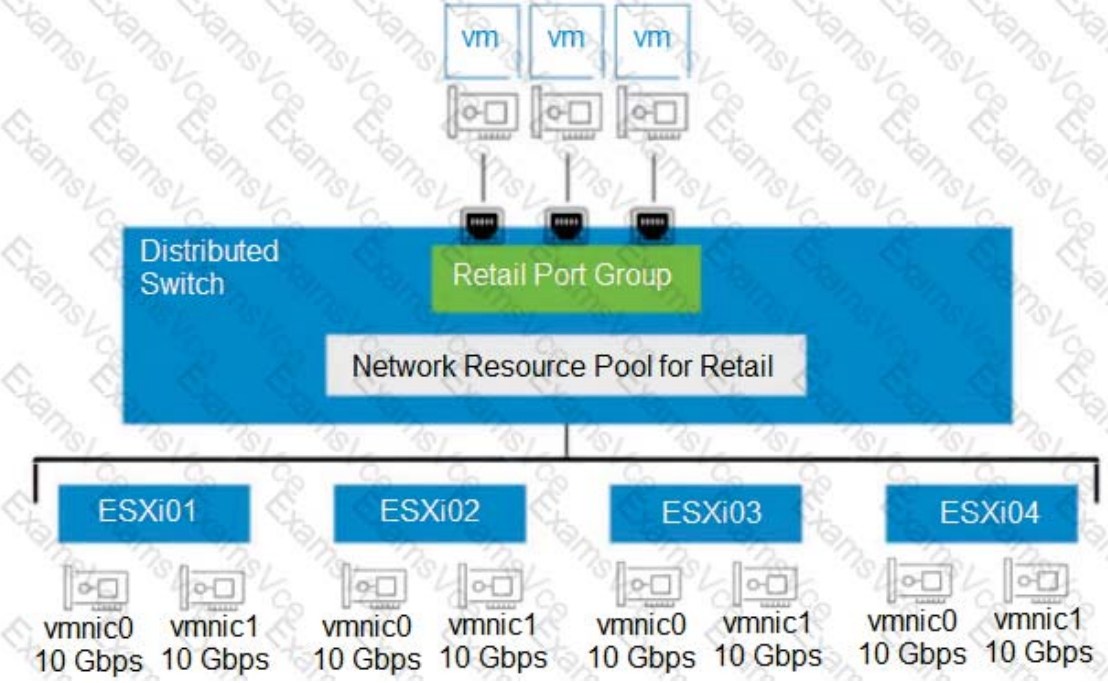 An administrator set up the following configuration:
- The distributed switch has four ESXi hosts, and each host has two 10 Gbps NIC
- In the Network I/O Control configuration, the amount of bandwidth reserved for virtual machine (VM) traffic if 4 Gbps.
The administrator wants to guarantee that VMs in the Retail distributed port group can access 50 percent of the available reserved bandwidth for VM traffic.
Given this scenario, what should the size (in Gbps) of the Retail network resource pool be?
- A. 40
- B. 32
- C. 8
-
D. 16
解答和参考链接
4Gbps*8Nic=32Gbps*50%=16GbpsQuestion 70
An administrator needs to configure a content library solution based on the following information:
- A new corporate virtual machine (VM) template is created every month to include all of the latest patches.
- The new VM template should be downloaded from the primary data center site (London) to two secondary data center sites (Tokyo and New York) as soon as possible.
- There is limited disk space available at one of the secondary data center sites (Tokyo) due to an ongoing data center consolidation project.
Which four steps should the administrator take to configure the content library solution before adding a VM template? (Choose four.)
- A. Create a new published content library In each secondary site
-
B. Configure the New York subscribed content library to download content immediately. - C. Configure the Tokyo subscribed content library to download content immediately
-
D. Configure the Tokyo subscribed content library to download content when needed -
E. Create a new published content library at the primary site - F. Configure the New York subscribed content library to download content when needed.
-
G. Create a new subscribed content library in each secondary site
解答和参考链接
The administrator should take these four steps to configure the content library solution before adding a VM template:
- Create a new published content library at the primary site, which allows the administrator to share the VM template with other sites.
- Configure the New York subscribed content library to download content immediately, which ensures that the new VM template is downloaded from the primary site as soon as possible.
- Configure the Tokyo subscribed content library to download content when needed, which saves disk space at the secondary site by downloading only the metadata of the VM template until it is deployed.
- Create a new subscribed content library in each secondary site, which allows the administrator to subscribe to the published content library at the primary site and synchronize the VM template.
Question 71
Refer to the exhibit.
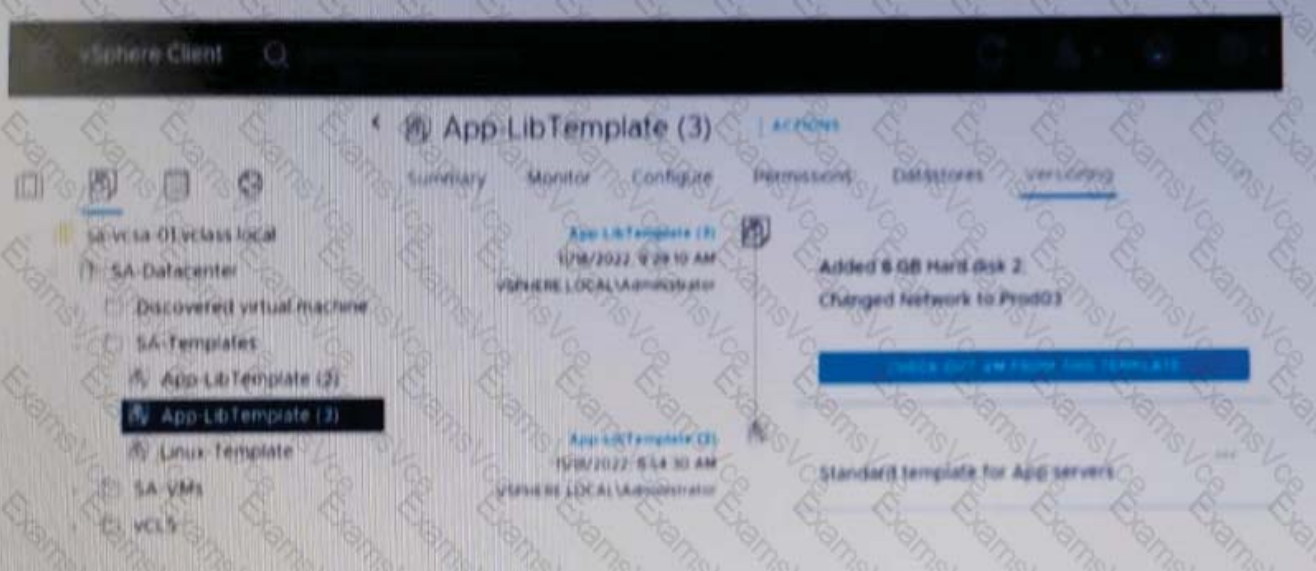 Given the configuration shown in the exhibit, what must the administrator do to delete only the latest version of the template?
- A. Delete App-LibTemplete(3) from the SA-Templates folder.
- B. In the SA-template folder, rename App-Libtemplate (2) to App-LibTemplate
- C. Check out AppLibTemplate (3) and delete the template from the SA-Templates folder.
-
D. Revert to APP-LibTemplate (2) and delete App-LibTemplate (3).
解答和参考链接
警告本解答由AI生成,仅供参考,请仔细甄别。
核心原理解析
在 vSphere 内容库中,当您对虚拟机模板进行更新时,它会形成一个版本链(1, 2, 3…)。
版本依赖性:内容库的模板管理遵循一种类似“栈”或“快照链”的逻辑。当前处于“Active”状态的通常是最新版本(本例中为版本 3)。
回滚(Revert)机制:如果您直接尝试删除最新版本,系统可能不允许,或者会影响整个模板对象的完整性。为了安全地移除最新版并保留之前的版本,管理员必须先将模板的状态**回滚(Revert)**到前一个稳定的版本(版本 2)。
删除特定版本:执行回滚操作后,版本 2 重新成为“当前版本”。此时,版本 3 将变为一个可以被单独清理的独立历史版本。
为什么其他选项不正确?
A. Delete App-LibTemplate(3) from the SA-Templates folder:在 vCenter 的文件夹视图(Folder View)中,模板通常显示为一个整体对象。您无法直接在文件夹中看到版本号并像删除普通文件一样删除其中的“版本 3”。
B. Rename App-Libtemplate (2) to App-LibTemplate:重命名操作只是改变了显示名称,并不会触发版本链的逻辑变更或物理删除多余的版本。
C. Check out AppLibTemplate (3) and delete…:“Check out”功能是用于编辑模板的(将其转换为虚拟机)。如果您签出版本 3,您只是创建了一个临时的 VM,这与删除内容库中的版本历史记录是两回事。
Question 72
An administrator is tasked with implementing a backup solution capable of backing up the Supervisor cluster,vSphere Pods,and persistent volumes.
Which two solutions must be used to meet this requirement? (Choose two.)
- A. VMware vCenter
-
B. Standalone Velero and Restic - C. NSX-T Manager
- D. vSphere Host Client
-
E. Velero Plugin for vSphere
解答和参考链接
警告本解答由AI生成,仅供参考,请仔细甄别。
核心原理解析
在 vSphere with Tanzu 环境中,标准的虚拟机备份方式无法直接感知 Kubernetes 的元数据(如 Namespaces、Secrets、Deployments)。因此,VMware 采用了开源项目 Velero 作为核心备份引擎。
E. Velero Plugin for vSphere (vSphere 专用 Velero 插件)
作用:这是实现该需求的关键组件。它作为 Supervisor 集群中的一个服务运行,专门负责与 vSphere 存储层对接。
功能:它允许 Velero 对 vSphere 原始存储上的持久卷(PV)进行快照,并将这些数据移动到外部存储(如 S3 兼容存储)。
B. Standalone Velero and Restic (独立 Velero 与 Restic)
Velero:作为命令行工具(CLI)和服务器端组件,负责协调备份流程,抓取 Kubernetes 的 API 对象(元数据)。
Restic:在很多 vSphere 环境中,如果底层存储不支持原生快照,Velero 会集成 Restic 来实现对文件系统级别的数据备份。通过两者结合,可以确保 Pod 的配置和其挂载的数据卷都能被完整备份。
为什么其他选项不正确?
A. VMware vCenter:vCenter 负责管理集群,但它本身没有内置备份 vSphere Pods 或 K8s 资源对象的功能。
C. NSX-T Manager:NSX-T 负责网络和安全策略。虽然它有自己的配置备份,但无法备份容器内的数据或应用定义。
D. vSphere Host Client:这是用于管理单台 ESXi 主机的网页界面,完全不具备集群级别的容器备份能力。
Question 73
An administrator is responsible for the management of a VMware vCenter instance that is currently experience performance issues. The administrator quickly identifies that the CPU and memory utilization of vCenter is consistently over 90%. Upon further analysis, it seems that the vpxd process is contributing significantly to the performance issue.
A combination of which four steps should the administrator take to resolve the performance issues and ensure that a similar issue can be rectified without required downtime to vCenter moving forward? (Choose four.)
-
A. Gracefully shutdown vCenter using the vSphere Client. - B. Enable CPU Hot add on the vCenter virtual machine.
-
C. Power on the vCenter Server Appliance using the vSphere Host Client. -
D. Add a additional CPU and memory to the vCenter Server Appliance. -
E. Enable CPU an Memory Hot add on the vCenter virtual machine. - F. Add a additional CPU and memory to the vCenter server machine.
解答和参考链接
警告本解答由AI生成,仅供参考,请仔细甄别。
为什么这四个是正确的?
✅ A. Gracefully shutdown vCenter using the vSphere Client
当前 CPU / 内存 Hot-Add 尚未启用
初次启用 Hot-Add 必须关机
“Gracefully” 是官方推荐方式,避免数据库损坏
👉 这是必须的前置步骤
✅ D. Add additional CPU and memory to the VCSA
vpxd 负载高 = vCenter 资源不足
官方解决方案第一步:纵向扩容(scale up)
扩容的是 VCSA(不是普通 VM)
✅ E. Enable CPU and Memory Hot add on the vCenter VM
这是题目后半句的关键:
“ensure that a similar issue can be rectified without required downtime moving forward”
启用 CPU / Memory Hot-Add 后:
以后可以 不停机加资源
避免再次 vCenter 停机
✅ C. Power on the VCSA using the vSphere Host Client
vCenter 已经被关机
不能再用 vSphere Client
必须用 ESXi Host Client 直接启动
👉 这是一个典型陷阱点,考试非常爱考
为什么其他选项是错的
❌ B. Enable CPU Hot add on the vCenter VM
只启用 CPU,不启用 Memory
vpxd 同时消耗 CPU + 内存
而且题目要求 未来彻底避免停机
👉 不完整,必错
❌ F. Add additional CPU and memory to the vCenter virtual machine
这是一个措辞陷阱
正确对象应是:
vCenter Server Appliance(VCSA)
VMware 官方文档与考试中:
对 vCenter 必须使用 Appliance 术语
此选项暗示“普通 VM”,不严谨
👉 考试按字面理解 → 错
Question 74
Refer to Exhibit:
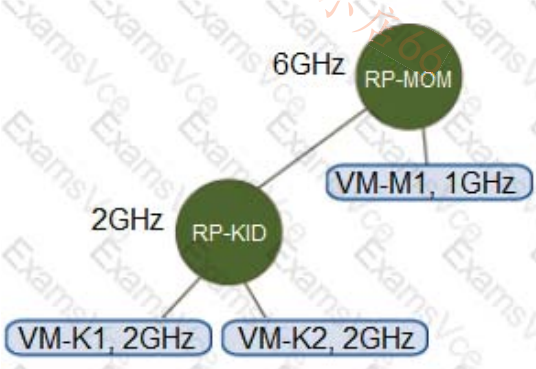 An environment has the following configuration:
- Resource Pool “RP-MOM? has a reservation of 6GHz and one running virtual machine (VM) “VM-M1? with 1 GHz reserved
- Resource Pool ^RP-KID? has a reservation of 2GHz, and expandable reservations is activated
The administrator creates two VMs, “VM-K1? and ‘VM-K2?, in the ”RP-KID? resource pool with 2GHz reserved for each, and turns on “VM-M1 ?
Given this scenario, which statement is true?
- A. The administrator must deactivate expandable reservations to turn on VM-K2
- B. The administrator can create a third VM ( VM-K3?) at RP-KID and reserve 6GHz
-
C. VM-K2 can be powered on because it can get the resources needed from RP-MOM. - D. VM-K2 cannot be powered on because there are not enough resources in RP-KID.
解答和参考链接
警告本解答由AI生成,仅供参考,请仔细甄别。
核心原理解析
要理解为什么 VM-K2 可以启动,我们需要分析可扩展预留 (Expandable Reservations) 的工作机制
- 资源池 RP-KID 的状态:
- 自身预留(Local Reservation):2 GHz。
- 策略:启用了可扩展预留。
- 虚拟机需求:
- VM-K1 请求 2 GHz 预留。RP-KID 自身的 2 GHz 正好完全分配给 VM-K1。
- VM-K2 请求额外的 2 GHz 预留。此时 RP-KID 内部已无可用预留资源。
- 可扩展预留的借调逻辑:
- 由于 RP-KID 开启了“可扩展预留”,当它内部资源耗尽时,它会向其**父级(Parent)**请求资源。
- 在本例中,RP-KID 和 VM-M1 都在 RP-MOM 下。这意味着 RP-MOM 是 RP-KID 的父资源池。
- 父级 RP-MOM 的可用资源计算:
- RP-MOM 总预留:6 GHz。
- 已消耗资源:
- VM-M1 占用:1 GHz。
- 子资源池 RP-KID 占用:2 GHz。
- 剩余可用预留:6 - 1 - 2 = 3 GHz。
- 最终结果:
- RP-KID 向 RP-MOM 借调 2 GHz。由于 RP-MOM 还有 3 GHz 空闲,它会批准这个请求。
- 因此,VM-K2 能够获得所需的 2 GHz 预留并成功开机。
为什么其他选项是错误的?
- A. 停用可扩展预留:这样做反而会导致 VM-K2 无法启动,因为 RP-KID 内部只有 2 GHz,在分配给 VM-K1 后就没钱给 VM-K2 了。
- B. 创建 VM-K3 并预留 6GHz:即便使用可扩展预留,也不能超过父级的上限。目前 RP-MOM 剩余 3 GHz,无法满足 6 GHz 的请求。
- D. 资源不足无法启动:这忽略了“可扩展预留”的功能,只有在父级资源也耗尽的情况下,D 才是正确的。
Question 75
An administrator is deploying a new all flash vSAN cluster based on the vSAN Original Storage Architecture (OSA).
What is the minimum supported network throughput in Gb/s for each host?
- A. 50
-
B. 10 - C. 25
- D. 1
解答和参考链接
警告本解答由AI生成,仅供参考,请仔细甄别。
核心要求解析
VMware 对 vSAN 网络的最低要求取决于存储配置的类型(混合 vs 全闪存):
全闪存 (All-Flash) 配置:
最低要求:10 Gb/s 专用网络。
原因:全闪存环境的 I/O 吞吐量极高,1 Gb/s 的带宽会成为严重的性能瓶颈,导致延迟增加,甚至在重建(Rebuild)或重新平衡(Rebalance)期间触发同步超时。
混合 (Hybrid) 配置:
最低要求:1 Gb/s 网络。
注意:虽然支持 1 Gb/s,但在生产环境中通常仍强烈建议使用 10 Gb/s,尤其是对于较大的工作负载。
Question 76
An administrator is tasked with configuring an appropriate Single Sign-On (SSO) solution for VMware vCenter based on the following criteria:
- The solution should support the creation of Enhanced Link Mode groups.
- All user accounts are stored within a single Active Directory domain and the solution must support only this Active Directory domain as the identity source.
- All user account password and account lockout policies must be managed within the Active Directory domain.
- The solution should support token-based authentication.
Which SSO solution should the administrator choose based on the criteria?
-
A. vCenter Identity Provider Federation with Active Directory Federation Services as the identity provider - B. vCenter Single Sign-On with Active Directory over LDAP as the identity source
- C. vCenter Single Sign-On with Active Directory (Windows Integrated Authentication) as the identity source
- D. vCenter Identity Provider Federation with Active Directory over LDAP as the identity provider
解答和参考链接
警告本解答由AI生成,仅供参考,请仔细甄别。
核心逻辑解析
- 为什么是 Identity Provider Federation (IdP)? 题目要求支持 Token-based authentication(基于令牌的身份验证)。
传统的“Active Directory over LDAP”或“Integrated Windows Authentication (IWA)”主要依赖用户名/密码或 Kerberos。
只有通过 Federation(联合身份验证),vCenter 才能将认证请求重定向到外部 IdP(如 AD FS),并接收现代化的安全令牌(如 SAML 或 OIDC 令牌)。
- 为什么选择 AD FS? 题目要求所有的密码和账户锁定策略必须在 AD 域中管理。
当使用 ADFS 时,vCenter 不再接触用户的明文密码。
用户在 ADFS 的登录界面输入凭据,ADFS 直接与 AD 交互执行策略。这种“外包认证”模式确保了 AD 的策略(如密码复杂度、15分钟锁定等)被 100% 强制执行。
- 关于增强型链接模式 (ELM) 这是 A 选项的一个重要特性。自 vSphere 7.0 Update 1 起,VMware 引入了 Identity Federation,它完全支持 Enhanced Link Mode。管理员可以配置多个 vCenter 实例使用同一个外部 ADFS 实例,从而实现跨 vCenter 的单点登录。
为什么排除其他选项?
B. Active Directory over LDAP:
不支持真正的 Token-based 现代身份验证(如 OIDC)。
vCenter 需要处理凭据,虽然可以验证密码,但在处理某些复杂的 AD 锁定策略时不如 ADFS 直接。
C. Active Directory (WIA):
已弃用 (Deprecated)。VMware 官方明确建议停止使用 IWA,转而使用 ADFS 联合或 AD over LDAP。
D. Identity Provider Federation with AD over LDAP:
这是一个不存在或表述错误的配置。Federation(联合)通常是与 ADFS、Okta 或 Azure AD 等身份提供者进行的,而不是直接与“LDAP 协议”进行联合。
Question 77
An administrator receives reports from the application team of poor performance of a virtual ma-chine (VM).The administrator reviews the virtual machine and discovers that it has 20 snapshots that are over 12 months old.
What could the administrator do to improve the VM’s performance?
- A. Inflate the base disk to make space for future snapshots.
- B. Revert to the latest snapshot.
-
C. Consolidate all of the snapshots into the base VM. - D. Identify and delete the largest delta .vmdk file.
解答和参考链接
警告本解答由AI生成,仅供参考,请仔细甄别。
核心解析
- 为什么快照会影响性能? 在 vSphere 中,每创建一个快照,系统就会创建一个增量磁盘文件(-delta.vmdk)。
读取延迟:当 VM 请求读取数据时,由于存在 20 个快照,系统可能需要从最新的增量文件开始,逐级向上溯源到基础磁盘(Base Disk)来查找所需的数据块。快照链越长,这种“读取放大”效应就越严重,导致 I/O 延迟增加。
锁定与管理开销:由于快照已存在 12 个月之久,这些增量文件可能已经增长到非常大,增加了底层存储元数据管理的负担。
- 为什么选择“合并(Consolidate)”? 操作本质:合并操作(以及快照管理器中的“删除所有快照”)会将所有增量文件中的更改写回基础磁盘。
结果:完成后,VM 将直接从单一的基础磁盘进行读写,彻底消除多层读取带来的延迟,从而显著提升性能。
为什么其他选项不正确?
A. Inflate the base disk:这用于将精简置备磁盘转换为厚置备磁盘。虽然可能微调性能,但它完全无法解决 20 个快照导致的读取链路过长问题。
B. Revert to the latest snapshot:这只是将 VM 的状态恢复到最后一次快照的时间点,但快照链依然存在,性能问题不会得到任何改善。
D. Identify and delete the largest delta .vmdk file:绝对不要手动删除单个增量文件! 这样做会破坏虚拟磁盘的完整性(Broken Disk Chain),导致虚拟机无法启动并发生数据丢失。
Question 78
The vCenter inventory contains a virtual machine (VM) template called Linux-01 The administrator wants to install a software patch into Linux-01 while allowing take to continue to access Linux-01 to deploy VMs.
Which series of steps should the administrator take to accomplish this task ?
- A.
- Verify that Linux-01 is in a content library.
- Clone Linux-01.
- Convert the clone to a VM.
- Install the software patch.
- B.
- Convert Linux-01 to a VM.
- Install the software patch.
- Convert the VM back to a VM template.
- Add Linux-01 to the content library.
- C.
- Verify that Linux-01 is in a content library.
- Checkout Linux-01.
- Install the software patch.
- Check in Linux-01.
- D.
Clone Linux-01.Convert the clone to a VM.Install the software patch.Convert the VM back to a template.
解答和参考链接
警告本解答由AI生成,仅供参考,请仔细甄别。
为什么选择 D?
在没有内容库的情况下,要满足“安装补丁”同时“不中断其他用户部署”这两个条件,必须通过克隆来操作:
Clone Linux-01 (克隆模板):直接在原模板上操作会导致模板进入“虚拟机”状态,此时其他用户无法利用它进行部署。因此,先克隆出一份副本。
Convert the clone to a VM (将克隆体转换为虚拟机):模板是无法开机运行的,必须转换回 VM 状态才能进入操作系统安装补丁。
Install the software patch (安装软件补丁):在转换后的 VM 中完成更新工作。
Convert the VM back to a template (将虚拟机转回模板):补丁完成后将其变回模板。
逻辑核心:
Linux-01(原模板):始终保持“模板”状态,没有被修改,因此其他用户可以继续通过它部署虚拟机。
副本:承担了更新的任务,更新完成后,你可以用这个新的模板替换旧模板。
选项对比分析
A 的错误:虽然流程类似,但它最后没有将 VM 转回模板,这意味着你最后只得到了一个普通的虚拟机,无法作为正式模板分发。
B 的错误:它直接将“Linux-01”转换为了虚拟机。在转换期间,由于 Linux-01 已经不是模板状态,其他用户将无法在菜单中找到它来执行部署任务,这违反了题目要求。
C 的错误:正如你指出的,如果环境里没提到 Content Library,Checkout/Check-in 功能根本不存在。
Question 79
Which VMware offering will allow an administrator to manage the lifecycle of multiple vCenter Server instances in a single software as a service (SaaS)-based solution to help drive operational efficiency?
- A. VMware vSphere with Tanzu
- B. VMware Cloud Foundation
-
C. VMware vSphere+ - D. VMware Aria Suite Lifecycle
解答和参考链接
警告本解答由AI生成,仅供参考,请仔细甄别。
VCF includes the management domain and multiple workload domains.
While VCF does use LCM to manage vCenter lifecycle, it is on-prem only (for now) and is not SaaS based.
That only leave vSphere+.
Question 80
An administrator needs to perform maintenance on a datastore that Is running the vSphere Cluster Services (vCLS) virtual machines (VMs).
Which feature can the administrator use in this scenario to avoid the use of Storage vMotion on the vCLS VMs?
- A. vSphere Distributed Resource Scheduler (DRS)
- B. vSphere vMotion
- C. vSphere Fault Tolerance
-
D. vCLS Retreat Mode
解答和参考链接
警告本解答由AI生成,仅供参考,请仔细甄别。
核心原理解析
vSphere Cluster Services (vCLS) 是从 vSphere 7.0 Update 1 开始引入的一项功能,用于确保集群服务(如 DRS 和 vSphere HA)的正常运行。这些轻量级虚拟机由 vCenter 自动管理。
为什么选择 vCLS Retreat Mode?
清理存储需求:在进行存储维护、下线数据存储或迁移整个集群时,通常需要移除存储在上面的 vCLS 虚拟机。
避免迁移开销:由于 vCLS 虚拟机是自动生成的,手动进行 Storage vMotion 既繁琐也不一定是最佳方案。
自动化处理:通过在集群上开启 Retreat Mode,管理员可以指示 vCenter 暂时删除(卸载) 该集群中的所有 vCLS 虚拟机。
恢复简便:维护完成后,只需将模式切回普通状态,vCenter 会自动在可用的数据存储上重新创建这些 vCLS 虚拟机。
为什么其他选项不适用?
A. vSphere Distributed Resource Scheduler (DRS):DRS 负责在主机之间平衡负载。虽然它依赖 vCLS 运行,但它本身无法将虚拟机从一个数据存储迁移到另一个数据存储(这是 Storage DRS 的功能)。
B. vSphere vMotion:这仅用于在主机之间在线迁移虚拟机,而不涉及存储路径的改变。题目明确要求避免使用 Storage vMotion。
C. vSphere Fault Tolerance (FT):这是为了实现虚拟机的零停机冗余,与存储维护和删除 vCLS 虚拟机无关。
如何开启 Retreat Mode?
在 vSphere Client 中,导航到 Cluster > Configure > Advanced Parameters。
点击 Edit Settings。
添加或修改参数 config.vcls.clusters.domain-c
将其值设置为 False(此时 vCLS 虚拟机会被自动删除)。
维护完成后,将其设回 True。
Question 81
If a distributed switch uses the “Route based on physical NIC load” load balancing algorithm, what does the mean send or receive utilization of an uplink need to exceed for the flow of traffic to move to the second uplink?
-
A. 75 percent of the capacity over a 30 second period - B. 60 percent of the capacity over a 30 second period
- C. 60 percent of the capacity over a 40 second period
- D. 75 percent of the capacity over a 40 second period
解答和参考链接
警告本解答由AI生成,仅供参考,请仔细甄别。
当 vSphere Distributed Switch 使用 Route based on physical NIC load(LBT) 时,负载迁移触发条件是固定且写死的:
触发条件(必须同时满足)
平均发送或接收利用率
-
超过物理 uplink 带宽的 75%
-
持续 30 秒
一旦满足这个条件,vDS 会:
找出 I/O 最高的虚拟机(port ID)
将该 VM 的流量迁移到 负载更低的 uplink
为什么其他选项一定是错的
❌ B. 60% / 30 秒
VMware 从未使用 60% 作为 LBT 阈值
❌ C. 60% / 40 秒
阈值和时间都不对
❌ D. 75% / 40 秒
时间错误,LBT 的检测周期是 30 秒,不是 40 秒
Question 82
What is the role of vSphere Distributed Services Engine?
- A. Provide a live shadow Instance of a virtual machine (VM) that mirror, the primary VM to prevent data loss and downtime during outages.
- B. Implement Quality of Service (QoS) on network traffic within a vSphert Distributed Switch.
-
C. Provide hardware accelerated data processing to boost infrastructure performance. - D. Redistribute virtual machines across vSphere cluster host affinity rules following host failures or during maintenance operations.
解答和参考链接
警告本解答由AI生成,仅供参考,请仔细甄别。
核心功能与角色
其核心角色是将基础设施服务从主 CPU 卸载(Offload) 到 数据处理单元 (DPU) 上,从而实现硬件加速。
硬件加速 (Hardware Acceleration):利用 DPU(也称为 SmartNIC)的计算能力来处理网络、存储和安全性等低级任务。
提升性能 (Boost Performance):由于原本由服务器 CPU 负担的这些任务被移交给了 DPU,服务器的 CPU 资源可以被完全释放,专注于运行业务虚拟机。
改善安全性:在物理层面上将基础设施管理与客户工作负载隔离开来,提高了系统的安全性。
选项深度解析
A. 错误:这是 vSphere Fault Tolerance (FT) 的功能。
B. 错误:虽然 Distributed Switch 支持 QoS,但这不是 Distributed Services Engine 的定义性角色。
C. 正确:它将网络和生命周期管理等服务从 CPU 卸载到 DPU,从而加速数据处理。
D. 错误:这是 vSphere DRS (Distributed Resource Scheduler) 的功能。
Question 83
An administrator is tasked with configuring vSphere Trust Authority. The administrator has completed the following steps:
- Set up the workstation
- Enabled the Trust Authority Administrator
- Enabled the Trust Authority State
- Collected information about the ESXi hosts and vCenter to be trusted
Which step does the administrator need to complete next?
-
A. Import the Trusted Host information to the Trust Authority Cluster - B. Import the Trusted Cluster information to the Trusted Hosts
- C. Create the Key Provider on the Trusted Cluster
- D. Import the Trusted Host information to the Trusted Cluster
解答和参考链接
警告本解答由AI生成,仅供参考,请仔细甄别。
核心流程解析
vSphere Trust Authority 将架构分为两个核心角色:受信任集群 (Trust Authority Cluster) 和 受信集群 (Trusted Cluster)。
在管理员完成了环境准备、启用管理员权限、开启状态并收集了基础信息(如主机元数据、证书、TPM 节点信息等)之后,接下来的逻辑是将这些数据填充到“信任源”中。
逻辑顺序:你已经“收集了信息”,现在必须将这些信息“输入”到管理端。
具体操作:管理员需要将从 ESXi 主机 收集到的身份信息(Identity)和证明信息(Attestation)导入到 Trust Authority Cluster。
目的:只有 Trust Authority Cluster 拥有了这些主机的“白名单”信息,它才能在后续步骤中对这些主机进行健康完整性校验(Attestation)。
为什么选择 A 而不是 D?
虽然两者看起来都在讨论导入信息,但 VMware 的官方文档和考试标准通常采用以下表述:
Trust Authority Cluster:指的是运行 Attestation Service(证明服务)和 Key Provider Service(密钥提供者服务)的专用服务器集群。
Trusted Cluster:指的是运行受保护工作负载(如加密虚拟机)的普通业务集群。
配置的下一步是将收集到的 ESXi 主机信息导入到负责审核它们的 Trust Authority Cluster 中。
vSphere Trust Authority 配置全流程回顾
为了确保万无一失,以下是完成该任务的五个关键步骤:
-
设置与启用:准备工作站,启用管理员和 vSTA 状态(题目已完成)。
-
信息收集:收集受信任主机的元数据。
-
导入信息 (当前步骤):使用 Add-TpmEndorsementKey 等命令将主机信息导入 Trust Authority Cluster。
-
配置证明服务:定义验证策略。
-
配置密钥服务:在受信任集群(Trusted Cluster)上配置 Provider 以获取加密密钥。
Question 84
An administrator has Windows virtual machines (VMs) and VMware Tools is installed in each VM. The administrator performs a status check of VMware Tools using vSphere Lifecycle Manager.
What is the VMware Tools status for the Windows VMs if the version of VMware Tools has a known problem and must be immediately upgraded?
-
A. Version Unsupported - B. Guest Managed
- C. Unknown
- D. Upgrade Available
解答和参考链接
警告本解答由AI生成,仅供参考,请仔细甄别。
核心状态解析
VMware 根据版本的健康状况和兼容性,将状态分为以下几种:
Version Unsupported (版本不受支持):当安装的版本存在严重缺陷、已知问题,或者版本过于陈旧以至于 VMware 不再提供技术支持时,会触发此状态。这种情况通常要求立即升级以确保虚拟机的稳定性和安全性。
Upgrade Available (有可用升级):这是一个更常见的状态。它表示当前的 VMware Tools 是受支持且正常的,但内容库或主机中有一个更新的版本。这不属于紧急修复,而是常规维护。
Guest Managed (客户机托管):当 VMware Tools 是通过操作系统自带的包管理器(如 Linux 的 open-vm-tools)安装和管理时,vCenter 会显示此状态。
Unknown (未知):通常发生在虚拟机未开机,或者 vCenter 无法与虚拟机内的 VMware Tools 进程通信时。
为什么在 Windows 环境中很重要?
对于 Windows 虚拟机,VMware Tools 包含关键的驱动程序(如 VMXNET3 网卡驱动和 PVSCSI 存储驱动)。
如果状态为 Version Unsupported,意味着该版本可能导致系统崩溃(BSOD)、网络中断或数据损坏。
vSphere Lifecycle Manager 允许管理员针对此类虚拟机创建补丁基准(Baseline),并进行批量修复(Remediate)。
Question 85
Administrator successfully installs VMware ESXi onto the first host of a new vSphere cluster but makes no additional configuration changes.
When attempting to log into the vSphere Host Client using the Fully Qualified Domain Name (FQDN) of the host, the administrator receives the following error message: “server Not Found –we can’t connect to the server at esxit101.corp.local.”
- Host FQDN: esxi101.corp.local
- Management VLAN ID: 10
- DHCP: No
- Management IP Address: 172.16.10.101/24
- Management IP Gateway: 172.16.10.1
- Corporate DNS Servers: 172.16.10.5, 172.16.10.6
- DNS Domain: corp.local
Which three high level tasks should the administrator complete, at a minimum, in order to successfully log into the vSphsrs Host Client using the FQDN for the esxi101 and complete the configuration (Choose three.)
-
A. Ensure a DNS A Record is created for the VMware ESXI host on the corporate DNS servers. - B. Update the VMware ESXI Management Network DNS configuration to use the corporate DNS servers for name, resolution.
-
C. Update the VMware ESXI Management Network IPv4 configuration to use a static a IPv4 address. - D. Configure at least two network adapters for the VMware ESXI Management Network.
-
E. Set the value of the VMware ESXI Management Network VLAN ID to 10. - F. Disable IPv6 for the VMware ESXI Management Network.
解答和参考链接
警告本解答由AI生成,仅供参考,请仔细甄别。
核心任务解析 A. Ensure a DNS A Record is created for the VMware ESXi host
原因:浏览器报错“Server Not Found”通常意味着 DNS 无法将 esxi101.corp.local 解析为 IP 地址 172.16.10.101。
操作:必须在企业 DNS 服务器(172.16.10.5/6)上手动创建一个 A 记录,将主机名指向其管理 IP。
C. Update the VMware ESXi Management Network IPv4 configuration to use a static IPv4 address
原因:题目明确说明 DHCP: No。ESXi 默认安装后可能会尝试获取 DHCP 或使用自动配置的链路本地地址。
操作:由于没有 DHCP,管理员必须在 DCUI(直观控制台界面)中手动将 172.16.10.101/24 和网关 172.16.10.1 配置为静态 (Static) 地址,否则主机在网络上将不可达。
E. Set the value of the VMware ESXi Management Network VLAN ID to 10
原因:题目指出 Management VLAN ID: 10。如果物理交换机端口配置为 Trunk 模式,而 ESXi 默认的 Management Network 未标记 VLAN(即 VLAN 0 或 None),则数据包无法在 VLAN 10 中传输。
操作:必须在管理网络设置中显式指定 VLAN ID 为 10,以确保与网关和 DNS 服务器的二层连通性。
为什么不选择其他选项?
B (Update DNS configuration on ESXi):虽然配置主机自身的 DNS 服务器很重要,但这主要影响主机解析别人的能力(例如主机解析 vCenter)。要让管理员通过浏览器访问主机,关键是 A 记录(选项 A)和基础网络连通。
D (Configure two network adapters):这是为了冗余,不是实现首次 FQDN 登录的必要条件。
F (Disable IPv6):禁用 IPv6 通常需要重启,虽然是推荐的优化步骤,但与解决当前的 FQDN 连接问题无关。
Question 86
An administrator is required to configure several Microsoft Windows virtual machines (VMs) to support Secure Boot for a critical secure application.
The following information is provided:
- The corporate security policy states that all forms of data encryption must utilize a key provider.
- The firmware of each VM is currently set to use Unified Extensible Firmware Interface (UEFI).
- Due to the nature of the application running within the VMs, the guest operating system for each VM is currently a minimum of Windows Server 2008 and Windows 7.
Which security feature should the administrator implement to meet these requirements?
- A. vSphere Virtual Machine Encryption
- B. vSphere Visualization-Based Security
- C. Virtual Intel Software Guard Extensions (vSGX)
-
D. Virtual Trusted Platform Module (vTPM)
解答和参考链接
警告本解答由AI生成,仅供参考,请仔细甄别。
核心原理解析
要支持 Microsoft Windows 的 Secure Boot(安全启动) 并满足企业对基于密钥提供者(Key Provider)的加密要求,vTPM 是必不可少的组件。
Secure Boot 与 UEFI 的关系:
题目提到虚拟机已经配置为 UEFI 固件。在 vSphere 中,启用 UEFI 是使用 Secure Boot 的先决条件。Secure Boot 确保只有经过签名且受信任的操作系统的引导加载程序才能运行。
vTPM 的作用:
安全性需求:Windows 10 及 Windows Server 2016 后的版本通常依赖 TPM 来实现高级安全特性。
数据加密与 Key Provider:在 vSphere 中,添加 vTPM 设备会自动要求该虚拟机进行加密。由于题目规定必须使用 Key Provider(如标准密钥提供者或受信任颁发机构),vTPM 正好利用了 vCenter 定义的 Key Provider 来保护其存储在 .nvram 文件中的敏感数据。
为什么其他选项不正确?
A. vSphere Virtual Machine Encryption:虽然这使用了 Key Provider,但它主要用于加密磁盘文件。它本身并不直接为操作系统提供“Secure Boot”所需的安全硬件抽象层。
B. vSphere Virtualization-Based Security (VBS):VBS 是一个更高层的功能,它通常需要 vTPM 作为基础。虽然它能提升安全性,但满足“Secure Boot”和“Key Provider 加密”最基础、最直接的组件是 vTPM。
C. Virtual Intel Software Guard Extensions (vSGX):SGX 是一种硬件隔离技术,允许应用程序在受保护的“飞地”(Enclaves)中运行。它与 Secure Boot 或虚拟机级别的磁盘/元数据加密没有直接关系。
Question 87
An administrator is tasked with looking into the disaster recovery (DR) options for a software-defined data center (SDDC).
The following requirements must be met:
- All virtual machines (VMs) must be protected to a secondary site.
- The source VMs must remain online until the failover.
- When failing over to the secondary site, application downtime is allowed
- The DR failover must be managed from the vSphere Client.
- Costs must remain as low as possible.
How can the administrator accomplish this task?
- A. Configure VMware Cloud Disaster Recovery (VCDR) and combine it with array-based storage replication.
-
B. Configure VMware a Site Recovery Manager and combine it with vSphere Replication. - C. Configure a subscribed content library on the secondary site.
- D. Configure VMware Site Recovery Manager and combine it with array-based storage replication.
解答和参考链接
警告本解答由AI生成,仅供参考,请仔细甄别。
核心逻辑解析
通过对比各项需求,我们可以得出为什么 SRM + vSphere Replication 是最佳平衡点:
低成本要求 (Costs must remain as low as possible):
vSphere Replication 是一种基于主机的复制技术。它不需要昂贵的特定型号存储阵列(Array-based Storage),也不需要额外的存储复制许可。它包含在大多数 vSphere 许可中,是成本最低的复制方案。
源虚拟机保持在线 (Source VMs must remain online until failover):
vSphere Replication 在后台异步同步数据,不会影响源 VM 的运行。只有在最终计划迁移的切断时刻,源 VM 才需要关机以确保最后的数据一致性。
允许应用停机 (Application downtime is allowed):
由于 vSphere Replication 是异步的,且在灾难恢复(DR)切换过程中需要更改 IP 或重新启动 VM,因此会存在一定的恢复时间目标(RTO)。这完全符合“允许停机”的要求。
在 vSphere Client 中管理:
VMware Site Recovery Manager (SRM) 与 vSphere Client 深度集成。管理员可以在同一个界面内创建恢复计划(Recovery Plans)、映射网络以及执行一键切换。
为什么排除其他选项?
A 和 D (Array-based storage replication):
基于阵列的复制通常需要同品牌、同型号的高端存储硬件,且往往涉及昂贵的厂商授权费。这与“成本尽可能低”的要求相悖。
C (Subscribed content library):
内容库主要用于分发模板、ISO 镜像和脚本。它不是一个灾难恢复解决方案,无法提供虚拟机的实时/异步数据同步或自动化的故障切换流程。
Question 88
An administrator is asked to configure a security policy at the port group level of a standard switch.
- The security policy must apply to all virtual machines on portgroup-1.
- All traffic must be forwarded, regardless of the destination.
The following requirements must be met:
- . Forged transmits set to reject
- B. MAC address changes set to accept
- C. Promiscuous mode set to reject
-
D. Promiscuous mode set to accept
解答和参考链接
警告本解答由AI生成,仅供参考,请仔细甄别。
核心原理解析
在 vSphere 标准交换机(Standard Switch)的端口组安全策略中,有三个关键选项。针对本题的需求,我们需要理解“混杂模式”的作用:
D. Promiscuous mode (混杂模式)
默认行为(Reject):标准交换机的端口只会将数据包转发到目标 MAC 地址与该虚拟网卡(vNIC)匹配的虚拟机。
启用行为(Accept):当设置为 Accept 时,连接到该端口组的虚拟机会接收到交换机在该 VLAN 上收到的所有流量。这通常用于运行网络监听工具(如 Wireshark)、入侵检测系统(IDS)或需要执行二层桥接的特殊应用。
对应需求:满足“转发所有流量,无论目的地”的要求。
为什么其他选项不正确?
A. Forged transmits (伪造传输):此设置控制是否允许虚拟机发送源 MAC 地址与其有效 MAC 地址不符的数据包。将其设置为 Reject 是一种安全增强手段,但它不影响流量的接收。
B. MAC address changes (MAC 地址更改):此设置控制当虚拟机更改其网卡的 MAC 地址时,交换机是否允许其接收流量。虽然设置为 Accept 允许更改,但它并不意味着虚拟机会接收发送给其他人的流量。
C. Promiscuous mode set to reject:这是默认的安全设置,它会阻止虚拟机查看不属于自己的流量,直接违反了题目的要求。
Question 89
An administrator is tasked with allowing a single user the ability to take snapshots on a virtual machine. When looking in vCenter, the administrator can see that there are already users and groups assigned permissions on the virtual machine as follows:
- The group VMJJsers has the Virtual Machine Power User role.
- The group VM_Viewers has the Read Only role.
The administrator confirms that the user requesting the additional access is currently one of five members of the VM_Viewers group.
Which two steps should the administrator take to grant this user the additional access required without impacting the user access of others? (Choose two.)
- A. Add the user to the VM_Users group and leave the permissions on the virtual machine object unchanged.
-
B. Add a new permission on the virtual machine object selecting the user and the new custom role. - C. Edit the Read Only role to add the Virtual Machine Snapshot Management privileges.
-
D. Create a new custom role with the Virtual Machine Snapshot Management privileges. - E. new permission on the virtual machine object selecting the VM_Viewers group and the new custom.
解答和参考链接
警告本解答由AI生成,仅供参考,请仔细甄别。
详细步骤解析
D. Create a new custom role with the Virtual Machine Snapshot Management privileges. 原因:vCenter 预置的“Read Only”角色不允许创建快照,而“Virtual Machine Power User”虽然权限大,但可能超出了该用户的实际需求。
操作:创建一个仅包含 Virtual Machine > Snapshot management > Create snapshot(以及必要的 State 权限)的自定义角色。这确保了权限的精确性。
B. Add a new permission on the virtual machine object selecting the user and the new custom role. 原因:该用户目前属于 VM_Viewers 组(Read Only)。如果直接修改组权限,组内其他 4 名用户也会获得快照权限。
冲突解决逻辑:在 vSphere 权限模型中,如果为一个特定用户直接分配了权限,该权限会**覆盖(Override)**通过组继承而来的权限。
结果:该用户将拥有“Read Only”+“Snapshot Management”权限,而组内其他成员维持“Read Only”不变。
为什么其他选项不正确?
A. Add the user to the VM_Users group:
后果:Virtual Machine Power User 角色权限非常广泛(包括删除 VM、修改配置等)。这违反了“最小特权原则”,给出的权限远远超过了“仅创建快照”的要求。
C. Edit the Read Only role:
后果:这会影响所有分配了该角色的用户和组。VM_Viewers 组的所有成员(以及系统中其他使用该角色的对象)都将获得快照权限。
E. New permission on the VM_Viewers group:
后果:同样会影响该组内的所有 5 名成员,无法实现针对“单个用户(single user)”的要求。
Question 90
An administrator has a requirement to revert a running virtual machine to a previous snapshot after a failed attempt to upgrade an application. When the administrator originally took the snapshot the following choices in the Take Snapshot dialog were made:
- Snapshot the virtual machine’s memory = false
- Quiesce guest file system = false
What will be the result of the administrator selecting the ‘Revert to Latest Snapshot?
Option to return the virtual machine to a previous snapshot?
- A. The virtual machine will be restored to the parent snapshot in a powered on state
-
B. The virtual machine will be restored to the parent snapshot in a powered off state. - C. The virtual machine will be restored to the child snapshot in a powered off state
- D. The virtual machine will be restored to the child snapshot in a powered on state.
解答和参考链接
警告本解答由AI生成,仅供参考,请仔细甄别。
核心合理解析
根据题目给出的快照配置:
- Snapshot the virtual machine’s memory = false:这意味着快照仅记录了虚拟磁盘(.vmdk)在那个时间点的数据状态,而没有保存运行中的内存数据(RAM)和 CPU 寄存器状态。
- 结果:由于没有内存数据可供恢复,虚拟机无法“继续”运行。因此,在执行恢复操作后,虚拟机会被还原到快照点时的磁盘状态,但其电源状态将变为关机(Powered Off)。
对比分析
为了更好地理解,我们可以对比不同的快照选项:
| 快照设置 | 恢复后的电源状态 | 说明 |
|---|---|---|
| 包含内存 (Memory=True) | 保持开机 (Powered On) | 虚拟机像从“休眠”中唤醒一样,保持之前的运行状态。 |
| 不含内存 (Memory=False) | 关机 (Powered Off) | 虚拟机回到当时的磁盘状态。你需要手动开机,就像“冷启动”一样。 |
| 静默文件系统 (Quiesce=True) | 取决于内存设置 | 仅用于确保磁盘上的应用程序数据一致性(如数据库),不影响电源状态。 |
为什么不是其他选项?
- A/D (Powered on state):只有在
Snapshot memory选为 True 的情况下,恢复后才会处于开机状态。 - C (Child snapshot):执行“Revert to Latest Snapshot”始终是将 VM 恢复到当前状态的直接 父级(Parent) 快照,而不是子级。
Question 91
Which two tasks can be completed using vSphere LifeCycle Manager? (Choose two.)
-
A. Manage the firmware lifecycle of ESXi hosts that are part of a managed cluster with a single image. -
B. Check that the ESXi hosts are compliant with the recommended baseline and update the hosts. - C. Upgrade VMware vCenter from version 7 to 8.
- D. Check the hardware compatibility of the hosts in a cluster against the VMware Compatibility Guide(VCG) using baselines.
- E. Manage the firmware lifecycle of ESXi hosts are part of a managed cluster using baselines.
解答和参考链接
警告本解答由AI生成,仅供参考,请仔细甄别。
核心功能解析
A. Manage the firmware lifecycle of ESXi hosts… with a single image.
原理:这是 vLCM 的标志性功能。在 单一镜像 (Single Image) 模式下,vLCM 不仅可以管理 ESXi 软件和驱动程序,还可以通过与硬件供应商(如 Dell, HPE, Lenovo)的 HSM (Hardware Support Manager) 集成,直接管理物理服务器的固件 (Firmware)。这实现了软件和硬件驱动的同步更新。
B. Check that the ESXi hosts are compliant with the recommended baseline and update the hosts.
原理:vLCM 继承并增强了之前的 vSphere Update Manager (VUM) 功能。它允许管理员创建基准 (Baselines)(包含补丁、扩展和升级包),扫描主机以检查合规性状态,并执行修复(Remediate)操作来更新主机。
为什么其他选项不正确?
C. Upgrade VMware vCenter from version 7 to 8:
错误原因:vCenter 的升级是通过 vCenter Server 安装程序 (Installer) 或其管理界面 (VAMI) 完成的,而不是由 vLCM 自身来升级自己。
D. Check the hardware compatibility… using baselines:
错误原因:硬件兼容性检查 (HCL/VCG) 只能在单一镜像 (Single Image) 模式下执行,无法在使用基准 (Baselines) 的模式下进行。
E. Manage the firmware lifecycle… using baselines:
错误原因:固件集成管理是 vLCM 单一镜像模式特有的功能。传统的基准模式 (Baselines) 只能管理软件和驱动,无法触达底层固件。
Question 92
Which four elements can a vSphere Lifecycle Manager image contain? (Choose four.)
-
A. ESXi base image - B. ESXI configuration
- C. Vendor agents
-
D. Vendor add-ons - E. BIOS updates
-
F. Firmware and drivers add-on -
G. Independent components
解答和参考链接
警告本解答由AI生成,仅供参考,请仔细甄别。
vLCM 镜像的四个要素
A. ESXi base image (ESXi 基础镜像):
这是镜像的核心,由 VMware 发布的标准 ESXi 发行版。它包含了运行虚拟化管理程序所需的基本操作系统文件。
D. Vendor add-ons (供应商加载项):
这是由 OEM 硬件供应商(如 Dell、HPE 或 Lenovo)提供的软件包。它通常包含特定于硬件的自定义内容、诊断工具和特定的驱动程序映射,用于将标准 ESXi 镜像调整为最适合该品牌服务器的状态。
F. Firmware and drivers add-on (固件和驱动程序加载项):
这是 vLCM 的强大之处。它允许通过 硬件支持管理器 (HSM) 集成特定的固件版本和配套驱动程序。这确保了物理服务器的底层硬件固件与 ESXi 层使用的驱动程序版本完全匹配。
G. Independent components (独立组件):
这些是第三方软件或不属于供应商加载项的独立包。常见的例子包括用于备份软件的代理(如 Veeam 传输服务)、特定的第三方监控工具或非 OEM 提供的特殊网卡驱动程序。
为什么排除其他选项?
B. ESXi configuration:虽然 vLCM 可以配合“配置托管”(vSphere Configuration Profiles)使用,但主机配置(如网络、安全设置)不属于 vLCM 镜像定义文件 (.json) 本身的软件组成部分。
C. Vendor agents:虽然供应商可能会提供代理软件,但在 vLCM 的术语中,它们被归类在“组件(Components)”或“加载项(Add-ons)”下,而不是作为一个独立的镜像分类要素。
E. BIOS updates:BIOS 更新通常包含在“固件和驱动程序加载项”中,作为 HSM 管理的一部分,它不是镜像架构中的一个顶层独立分类。
Question 93
An administrator has a host profile named Standard-Config. The administrator wants to change the other host profiles to use only the storage configuration settings that are defined in the Standard-Config host profile.
What should the administrator do to make this change?
- A. Export host customizations and import them to the other host profiles.
-
B. Copy the storage settings from Standard-Config to all other host profiles. - C. Duplicate the Standard-Config host profile and only modify the storage configuration settings.
- D. Export the Standard-Config host profile and attach it to the other hosts.
解答和参考链接
警告本解答由AI生成,仅供参考,请仔细甄别。
核心机制解析
vSphere 的 主机配置文件 (Host Profiles) 提供了一个非常强大的功能,称为“复制设置 (Copy Settings)”。这允许管理员执行细粒度的配置克隆,而无需手动重新配置每一个配置文件。
操作逻辑:在 vSphere Client 中,你可以选择源配置文件(即 Standard-Config),然后选择将其中特定的子集(如 Storage Configuration)复制到一个或多个目标配置文件中。
优势:
-
精准性:它只覆盖目标配置文件中的存储部分,保持目标配置文件的网络、安全或其他设置不受干扰。
-
一致性:确保整个集群或数据中心内的存储策略(如存储声明规则、多路径配置等)完全统一。
为什么其他选项不合适?
A. Export host customizations:主机自定义(Host Customizations)包含的是主机特有的信息(如静态 IP 地址、主机名)。导入这些信息并不能改变主机配置文件(策略模板)本身的定义,且会导致严重的配置冲突。
C. Duplicate the Standard-Config…:这会创建一个全新的配置文件。虽然你可以修改它,但它并没有解决如何更新“现有其他”主机配置文件的问题。你需要重新关联所有主机,过程繁琐且容易出错。
D. Export the Standard-Config and attach it:将 Standard-Config 附加到其他主机虽然能统一配置,但它会完全覆盖目标主机原本特有的其他非存储配置(如特殊的网络配置)。题目要求的是“只使用存储配置设置(use only the storage configuration settings)”。
Question 94
What are two use cases for VMware vSphere+? (Choose two.)
-
A. Enhance on-premises workloads by managing them through the VMware Cloud Console - B. Allow live migration between on-premises and VMware Cloud
- C. Increase the performance of the native vCenter vMotion capability
- D. Allow the creation of affinity and anti-affinity rules to be used during failover events
-
E. Simplify vCenter lifecycle management through cloud-enabled automation
解答和参考链接
警告本解答由AI生成,仅供参考,请仔细甄别。
核心机制解析 vSphere+ 是 VMware 推出的订阅制多云服务,它将传统的本地 vSphere 环境与 VMware Cloud 管理平面相连接,但不需要将工作负载迁移到公有云。
A. 通过 VMware Cloud Console 管理本地工作负载
原理:vSphere+ 通过安装在本地的 Cloud Gateway 将 vCenter 连接到 VMware Cloud 控制台。
价值:管理员可以在一个统一的云端界面(SaaS 模式)中监控和管理分布在不同物理位置(不同数据中心、不同国家)的所有本地集群。这种“单一窗格”管理极大提升了全局可见性。
E. 通过云端自动化简化 vCenter 生命周期管理
原理:这是 vSphere+ 的“杀手锏”功能。传统的 vCenter 升级通常涉及手动下载 ISO、挂载并运行复杂的安装程序。
价值:在 vSphere+ 中,vCenter 的更新被简化为**一键式(Cloud-enabled automation)**操作。VMware Cloud 会自动检测新版本,管理员只需在云端点击更新,系统会自动完成镜像下载、验证和原位升级,极大地减轻了运维负担。
为什么其他选项不正确?
B. Allow live migration between on-premises and VMware Cloud:这是 VMware HCX 的核心功能,虽然 vSphere+ 属于云家族,但它本身的主要目的不是提供跨云的热迁移,而是管理本地环境。
C. Increase the performance of vMotion:vMotion 的性能主要取决于底层的网络带宽(如 10GbE/25GbE)和 CPU 性能。vSphere+ 作为管理层,不直接改变数据平面 vMotion 的传输速度。
D. Allow the creation of affinity rules…:这是 vSphere DRS 的基础功能,已经在标准版 vSphere 中存在多年,并非 vSphere+ 的特有使用场景。
Question 95
A group of new virtual machines have been deployed using thin-provisioned disks due to the limited storage space available in an environment. The storage team has expressed concern about extensive use of this type of provisioning. An administrator is tasked with creating a custom alarm to notify the storage team when thin provisioning reaches a certain capacity threshold.
Where must the administrator define this alarm?
-
A. Datastore - B. Data center
- C. Datastore cluster
- D. Virtual machine
解答和参考链接
警告本解答由AI生成,仅供参考,请仔细甄别。
核心原理解析
在 vSphere 中,警报的定义位置(对象层级)决定了它能监控的指标类型。
指标归属:精简置备的利用率是存储层的属性。虽然虚拟机是存储的使用者,但磁盘文件的实际大小、物理存储空间的剩余量以及“超额分配”的比例,都是在**数据存储(Datastore)**级别计算的。
警报机制:在 Datastore 级别定义警报,可以监控整个存储卷的“磁盘使用量(Disk Usage)”或“已分配空间”。当所有精简置备磁盘的总实际占用空间接近物理上限时,只有 Datastore 级别的警报能最准确地反馈风险。
为什么其他选项不适用?
B. Data center:虽然可以在数据中心级别定义警报并让其向下继承,但这通常用于通用的全局规则。对于特定存储策略的监控,Datastore 是最直接的目标对象。
C. Datastore cluster:如果环境使用了存储负载均衡(Storage DRS),可以配置存储集群警报,但题目背景通常指的是针对单个物理卷容量的监控。
D. Virtual machine:在虚拟机级别定义警报只能监控单个 VM 的磁盘占用,无法全局感知物理存储的告急情况,且管理上极其繁琐。
Question 96
A vSphere cluster hosts a three-tier application The cluster has 50% resources available. If a host in the cluster fails, the database server must be online before the application server, and the application server must be online before the Web server.
Which feature can be used to meet these requirements?
- A. Predictive DRS
-
B. vSphere HA Orchestrated Restart - C. vSphere HA Restart Priority
- D. Proactive HA
解答和参考链接
警告本解答由AI生成,仅供参考,请仔细甄别。
核心原理解析
虽然 vSphere HA 的基础功能是重启虚拟机,但要实现跨虚拟机的依赖关系,必须使用编排功能。
为什么选择 vSphere HA Orchestrated Restart?
依赖关系管理:该功能允许管理员定义“虚拟机到虚拟机”的依赖关系规则。
分层启动:你可以创建一个依赖链,明确指定“应用服务器”必须等待“数据库服务器”进入就绪状态(Heartbeat 或应用程序检测)后才能启动。
自动化故障恢复:当主机发生故障时,vSphere HA 不会随机启动 VM,而是严格按照预设的逻辑顺序在剩余主机上拉起服务。
为什么其他选项不适用?
C. vSphere HA Restart Priority(重启优先级):
限制:虽然你可以将虚拟机设置为“高、中、低”优先级,但这不能保证前一个虚拟机完全启动成功后再启动下一个。它只是优先分配资源给高优先级的 VM。如果数据库启动很慢,应用服务器可能会在数据库还没准备好时就开始启动,导致服务连接失败。
A. Predictive DRS(预测性 DRS):
功能:结合 vRealize Operations 的历史数据预测负载峰值并提前迁移 VM。它与故障后的启动顺序无关。
D. Proactive HA(主动 HA):
功能:根据硬件传感器的健康状态(如风扇故障、电源不稳定),在主机真正失效前将 VM 迁移走。这属于预防措施,而非故障后的重启编排。
Question 97
An administrator is tasked with applying updates to a vSphere cluster running vSAN using vSphere Lifecycle Manager. Downtime to the ESXI hosts must be minimal while the work Is completed.
The administrator has already completed the following steps and no errors have been returned:
- Downloaded all applicable software and created a new Image
- Attached the new Image to the cluster and run a compliance check against the Image for the cluster
- Run a remediation pre-check for the cluster
Which two series of steps should the administrator perform to start the remediation of the cluster using the new image? (Choose two.)
- A.
- Use the Remediate option In vSphore Lifecycle Manager to remediate all of the ESXI hosts in the cluster In parallel.
- Allow vSphere Lifecycle Manager to automatically control maintenance mode on the ESXI hosts.
- B.
- Place each of the ESXI hosts into maintenance mode manually.
- Use the Stage option In vSphere Lifecycle Manager to stage the required software on all ESXi hosts one at a time.
- C.
- Leave all ESXI hosts In the cluster operational.
- Use the Stage All option In vSphere Lifecycle Manager to stage the required software onto all ESXI hosts one at a time.
- D.
Leave all ESXI hosts In the cluster operational.Use the Stage All option In vSphere Lifecycle Manager to stage the required software onto all ESXI hosts In the cluster In parallel.
- E.
Use the Remediate Option In vSphere Lifecycle Manager to remediate all of the ESXI hosts In the cluster In sequence.Allow vSphere Lifecycle Manager to automatically control maintenance mode on the ESXI hosts.
解答和参考链接
警告本解答由AI生成,仅供参考,请仔细甄别。
核心原理解析
在 vSphere Lifecycle Manager (vLCM) 中,**“最小化停机时间”**通常通过两个阶段实现:**暂存(Staging)以减少修复时间,以及有序修复(Sequential Remediation)**以维持集群可用性。
为什么选择 D (Stage All in Parallel)?
暂存的作用:Stage 操作会将新的镜像文件和驱动程序提前从 vCenter 传输到 ESXi 主机的本地存储中。
并行效率:在主机正常运行(Operational)时执行并行暂存,不会影响虚拟机运行。这消除了在正式“修复”阶段等待大文件传输的时间,从而缩短了每台主机处于维护模式的总时长。
为什么选择 E (Remediate in Sequence)?
vSAN 的特殊性:对于 vSAN 集群,绝对不能并行(Parallel)修复所有主机(即选项 A 是错误的)。如果所有主机同时进入维护模式,vSAN 存储将完全不可用。
自动维护模式:vLCM 能够自动管理维护模式(Maintenance Mode)。它会按照顺序(Sequence)一次处理一台主机:将虚拟机迁移走、置入维护模式、更新、重启、退出维护模式,然后处理下一台。这确保了集群在整个过程中始终有足够的资源和存储副本。
选项深度解析
A. 错误:在 vSAN 集群上进行并行修复会导致整个集群宕机,且不符合 vSAN 数据一致性要求。
B. 错误:手动置入维护模式并逐一暂存效率极低,违背了“最小化工作量”和“最小化停机时间”的初衷。
C. 错误:虽然暂存时主机保持运行是正确的,但“逐一(one at a time)”暂存没有必要,浪费了网络带宽和时间。References:
Question 98
When configuring vCenter High Availability (HA), which two statements are true regarding the active,passive, and witness nodes? (Choose two.)
-
A. Network latency must be less than 10 milliseconds. - B. They must have a supported Wide Area Network (WAN).
- C. They must have a minimum of a 10 Gbps network adapter.
-
D. They must have a minimum of a 1 Gbps network adapter. - E. Network latency must be more than 10 milliseconds.
解答和参考链接
警告本解答由AI生成,仅供参考,请仔细甄别。
核心解析
A. Network latency must be less than 10 milliseconds
原理:vCenter HA 要求 Active 节点与 Passive 节点之间通过 vCenter HA 网络进行实时数据复制(PostgreSQL 数据库同步)和状态心跳检测。
延迟要求:为了保证数据库同步的性能并防止由于网络延迟导致的错误故障转移(Failover),节点间的往返时间 (RTT) 延迟必须 小于 10 毫秒。
物理位置:由于此延迟限制,vCenter HA 节点通常部署在同一个数据中心内,或者通过极高速的光纤链路连接的近距离站点。
D. They must have a minimum of a 1 Gbps network adapter
带宽要求:VMware 官方文档规定,专用于 vCenter HA 流量的网络适配器带宽至少应为 1 Gbps。
用途:该带宽主要用于处理 Active 节点与 Passive 节点之间的初始数据同步以及运行期间的持续状态复制。在大型环境中,如果 vCenter 数据变动频繁,带宽不足会直接影响 HA 的同步效率。
为什么其他选项不正确?
B. They must have a supported WAN:
错误原因:虽然理论上可以通过 WAN 连接,但必须满足极苛刻的延迟(<10ms)和带宽要求。由于大多数 WAN 无法稳定保证 <10ms 的延迟,因此 WAN 并不是 vCenter HA 的“必须”条件,反而通常是限制条件。
C. They must have a minimum of a 10 Gbps network adapter:
错误原因:虽然 10 Gbps 性能更好,但不是最低强制要求。1 Gbps 即可满足大多数生产环境的需求。
E. Network latency must be more than 10 milliseconds:
错误原因:这与实际要求完全相反。高延迟会导致心跳超时,引发不必要的节点切换。
Question 99
A company has two sites: Site A and Site B. The administrator would like to manage the VMware vCenter inventories in both sites from a single vSphere Client session.
Which vCenter feature must be configured?
- . VMware Certificate Authority
- B. VMware Site Recovery Manager
- C. vCenter Single Sign-On
-
D. Enhanced Linked Mode
解答和参考链接
警告本解答由AI生成,仅供参考,请仔细甄别。
核心原理解析
Enhanced Linked Mode (ELM) 是专门为跨多个 vCenter Server 实例提供统一管理界面的技术。
单一窗格管理 (Single Pane of Glass):配置 ELM 后,登录到 Site A 的 vSphere Client,你不仅可以看到 Site A 的资源(主机、虚拟机、数据存储),还能同时看到并操作 Site B 的资源。
资源共享:它允许跨链接的 vCenter 实例进行搜索、复制角色、权限以及标签。
先决条件:要启用 ELM,两个站点的 vCenter Server 必须加入同一个 vCenter Single Sign-On (SSO) 域。
为什么其他选项不正确?
A. VMware Certificate Authority (VMCA):这是 vCenter 内部负责管理 SSL 证书的服务,与跨站点的 UI 集成管理无关。
B. VMware Site Recovery Manager (SRM):这是用于灾难恢复(DR)的自动化方案。虽然它通常在两个站点间运行,但它的作用是处理虚拟机切换和恢复计划,而不是提供基础的库存链接功能。
C. vCenter Single Sign-On (SSO):虽然 SSO 是实现 ELM 的基础组件(必须在同一个 SSO 域内),但 SSO 本身只负责身份验证。仅有 SSO 而不配置链接模式,你仍需分别登录两个 vCenter 实例。Enhanced Linked Mode 才是实现“单会话管理”的具体功能。
Question 100
An administrator notices a Fibre Channel adapter in an ESXi host has been experiencing inconsistent connectivity states.
Which trigger can be used to quickly identify the issue and alert the administrator so that the issue can be resolved?
- A. Host Connection Lost
- B. Lost Network Path Redundancy
- C. Lost Network Connectivity
-
D. Lost Storage Connectivity
解答和参考链接
警告本解答由AI生成,仅供参考,请仔细甄别。
以下是深度解析:
- 为什么选择 D 而非 B? 即使遵循最佳实践配置了冗余路径,这两个触发器的行为逻辑有本质区别:
D. Lost Storage Connectivity (丢失存储连接):
监控对象:存储路径(Storage Paths)。
逻辑:只要有一个 HBA 卡或一条路径变为“Dead”状态,该警报就会触发。它不关心你是否还有其他存活路径,它的职责是告诉你:“原本存在的某条存储通道现在断开了”。这正是“快速识别 HBA 卡连接不一致”所需的灵敏度。
B. Lost Network Path Redundancy (丢失网络路径冗余):
监控对象:以太网(Ethernet) 适配器(vmnic)和端口组。
逻辑:它监控的是上行链路(Uplink)的冗余。最重要的是,在 VMware 术语中,“Network”特指以太网流量。即使你的 FC 存储完全断开,只要你的 Management 或 VM Network 还是冗余的,这个警报绝不会触发。
- 核心术语区分:Storage vs. Network 在 vCenter 的警报系统中,分类非常严格:
-
Storage 触发器:处理 HBA、LUN、光纤路径(FC/iSCSI/FCoE)。
-
Network 触发器:处理标准/分布式交换机、物理网卡(NIC)、VLAN。
由于题目明确提到了 Fibre Channel adapter (HBA),这属于存储硬件,因此必须查看 Storage 类别的触发器。
- 如果环境具有冗余性(Multipathing) 如果环境是冗余的,且一条路径丢失,虚拟机不会宕机(因为有其他路径)。
D. Lost Storage Connectivity 会立即报“警告”或“错误”,提示管理员某张 HBA 卡或某个 SFP 模块可能坏了。
如果使用的是某些特定版本的 vSphere,还会有 “Lost Storage Path Redundancy” 触发器。但即便如此,它依然属于 Storage 范畴,而不是选项 B 描述的 Network 范畴。
总结
对于 FC HBA 卡的不稳定问题,D. Lost Storage Connectivity 是最符合逻辑的答案。它能捕获路径状态从 Active 到 Dead 的切换,从而让管理员定位到那块“不一致”的适配器。
Question 101
An administrator is tasked with moving an application and guest operating system (OS) running on top of a physical server to a software-defined data center (SDDC) in a remote secure location.
The following constraints apply:
- The remote secure location has no network connectivity to the outside world.
- The business owner is not concerned if all changes in the application make it to the SDDC in the secure location.
- The application’s data is hosted in a database with a high number of transactions.
What could the administrator do to create an image of the guest OS and application that can be moved to this remote data center?
- A. Create a hot clone of the physical server using VMware vCenter Converter.
-
B. Create a cold clone of the physical server using VMware vCenter Converter. - C. Restore the guest OS from a backup.
- D. Use storage replication to replicate the guest OS and application.
解答和参考链接
警告本解答由AI生成,仅供参考,请仔细甄别。
核心原理解析
在这种受限环境下,选择 Cold Clone(冷克隆) 而非其他选项的原因如下:
-
物理到虚拟的转换 (P2V):由于目标是物理服务器,需要使用 VMware vCenter Converter。
-
高事务数据库的一致性:题目提到应用数据存储在“高事务量”的数据库中。如果使用“热克隆(Hot Clone)”,在克隆过程中数据会不断变化,由于没有持续的网络同步,克隆出来的镜像极易出现数据库损坏或数据不一致的情况。
-
离线迁移需求:远程安全位置没有外部网络连接。冷克隆允许管理员使用引导介质(ISO/USB)启动物理服务器,在操作系统未运行的状态下抓取完整的静态镜像。由于操作系统处于静态,抓取的镜像最为稳定。
-
数据一致性:冷克隆通过关闭源服务器的服务来确保“时间点”的一致性,这对于高事务数据库至关重要,能保证应用在 SDDC 启动后无需复杂的数据库修复即可运行。
为什么其他选项不适用?
A. Hot Clone (热克隆):热克隆依赖于网络连接来同步克隆过程中的增量变化。在“高事务”环境下,如果网络受限或不允许持续同步,克隆出的数据库文件往往处于崩溃一致性状态(Crash-consistent),可能无法正常启动。
C. Restore from backup:虽然可以恢复备份,但前提是你在远程位置拥有兼容的备份基础设施。相比之下,Converter 提供的 P2V 过程更直接地处理硬件抽象层(HAL)的转换,确保物理机驱动在虚拟机环境下能正常工作。
D. Storage replication (存储复制):这要求源物理服务器和目标 SDDC 之间有高速、低延迟的光纤或以太网连接。题目明确指出“无外部网络连接”,因此复制无法实施。
Question 102
An administrator wants to allow a DevOps engineer the ability to delete Tanzu Kubernetes Grid (TKG) cluster objects in a vSphere Namespace.
Which role would provide the minimum required permissions to perform this operation?
- A. Administrator
- B. Can View
- C. Owner
-
D. Can Edit
解答和参考链接
警告本解答由AI生成,仅供参考,请仔细甄别。
角色权限解析 vSphere 命名空间主要有三种内置角色,它们在 TKG 集群管理中的权限如下:
Can Edit (D):
- 权限级别:这是满足要求的最小特权。
- 能力:允许用户创建、修改和删除命名空间内的资源,包括 Tanzu Kubernetes Grid (TKG) 集群、持久卷声明(PVCs)和服务。
- 适用场景:专门为需要执行日常开发和部署任务(包括清理资源)的 DevOps 工程师设计。 Owner (C):
- 权限级别:最高级别。
- 能力:除了包含 “Can Edit” 的所有权限外,还允许用户修改命名空间本身的设置、管理其他用户的权限。虽然它可以删除集群,但对于仅仅需要操作集群对象的工程师来说,权限过大。 Can View (B):
- 权限级别:只读。
- 能力:仅允许查看命名空间内的资源及其状态,无法执行任何删除或创建操作。 Administrator (A):
- 通常指 vCenter 级别的系统管理员,其权限远超命名空间范围,不符合“最小特权原则”。
Question 103
An administrator has mapped three vSphere zones to three vSphere clusters.
Which two statements are true for this vSphere with Tanzu zonal Supervisor enablement? (Choose two.)
-
A. One Supervisor will be created in a specific zone. - B. One Supervisor will be created across all zones.
- C. Three Supervisors will be created in Linked Mode.
-
D. Individual vSphere Namespaces will be placed into a specific zone. - E. Individual vSphere Namespaces will be spread across all zones.
解答和参考链接
Explanation
When mapping vSphere zones to vSphere clusters, one Supervisor will be created in each zone, and individual vSphere Namespaces will be placed into a specific zone based on their resource requirements and availability constraints.
Question 104
An administrator is tasked with implementing a backup solution capable of backing up the Su-pervisor cluster, vSphere Pods, and persistent volumes.
Which two solution must be used to meet this requirement? (Choose two.) :
- A. VMware vCenter
-
B. Standalone Velero and Restic - C. NSX-T Manager
- D. vSphere Host Client
-
E. Velero Plugin for vSphere